10-Marble
August 11, 2025
Solved

Is it possible to read data from several tabs in Mathcad 15 from an excel file?
  • August 11, 2025
  • 2 replies
  • 904 views

Is it possible to read data from several tabs in Mathcad 15 from an excel file?

Snag_1519f88f.png

Best answer by Werner_E

I don't know of any built-in way to get the number of sheets in an Excel file or (equally important) the names of the sheets.

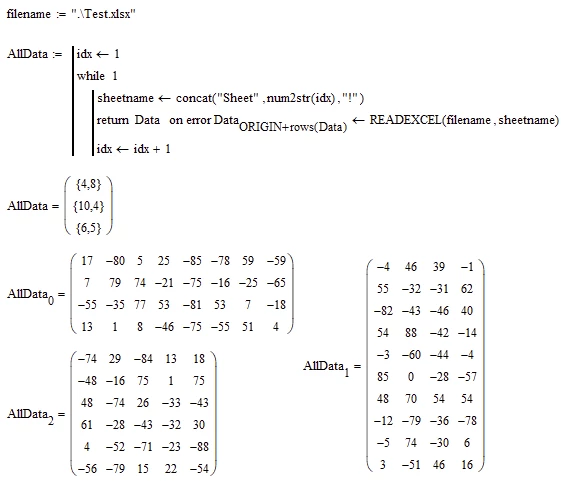
As long as the names of all sheets are left at their default value (which is "Sheet" in English versions followed by a number starting by "1")  you can let Mathcad read in the sheets until it fails. Failing could mean that no further sheet is found but it could also mean that the next sheet has a different name.

The attached demo Excel file consists of four sheets. The first three have the names "Sheet1", "Sheet2" and "Sheet3", but the fourth is names "Tabelle4" (which is the default name in the German Excel version).

The aforementioned approach will only read in the data from the first three sheets and stop.

The "range" parameter provided in the READEXCEL function is just "Sheet1!" without providing a cell address and so the data from the whole sheet is read in.
Werner_E_0-1754923803400.png


BTW, Prime still lags behind the ancient Mathcad15 in many respects, but one of the improvements in Prime is that READEXCEL allows you to address the individual sheets of an Excel file by their number (regardless of their name). So in Prime with the approach presented here, you could really read in all the sheets of the file.


2 replies

12-Amethyst
August 11, 2025

There is no ban and nothing interferes.

10-Marble
August 11, 2025

How to do this? If I do this via "Insert - Data - Input from file...", then reading occurs only from the first tab. How to make reading from all tabs?

25-Diamond I
August 11, 2025

You may use the READEXCEL function multiple times to do the job.

Werner_E_0-1754911377620.png


10-Marble
August 11, 2025

If you don't know in advance how many tabs an excel file contains, is there a way to read the data?

Werner_E25-Diamond IAnswer
25-Diamond I
August 11, 2025

I don't know of any built-in way to get the number of sheets in an Excel file or (equally important) the names of the sheets.

As long as the names of all sheets are left at their default value (which is "Sheet" in English versions followed by a number starting by "1")  you can let Mathcad read in the sheets until it fails. Failing could mean that no further sheet is found but it could also mean that the next sheet has a different name.

The attached demo Excel file consists of four sheets. The first three have the names "Sheet1", "Sheet2" and "Sheet3", but the fourth is names "Tabelle4" (which is the default name in the German Excel version).

The aforementioned approach will only read in the data from the first three sheets and stop.

The "range" parameter provided in the READEXCEL function is just "Sheet1!" without providing a cell address and so the data from the whole sheet is read in.

Werner_E_0-1754923803400.png


BTW, Prime still lags behind the ancient Mathcad15 in many respects, but one of the improvements in Prime is that READEXCEL allows you to address the individual sheets of an Excel file by their number (regardless of their name). So in Prime with the approach presented here, you could really read in all the sheets of the file.