
1-Visitor
January 24, 2014
Solved

Issues with Embedded MS Objects (Excel, Powerpoint)

  • January 24, 2014
  • 2 replies
  • 39037 views

Greetings,

My company uses Mathcad for a lot of our calculations and we've developed some standards over the years. One of those standards was the use of embedded excel objects to serve as a header/footer for our calculations (I know that there is a built in header/footer, but it lacks Aesthetics, Flexibility, and Convenience).

There is the dilemma: more often than not, especially with Excel 2013, numerous popup windows and excel windows pop up for every embedded excel object in each Mathcad worksheet; VERY ANNOYING! If there is a solution to this, please tell me.

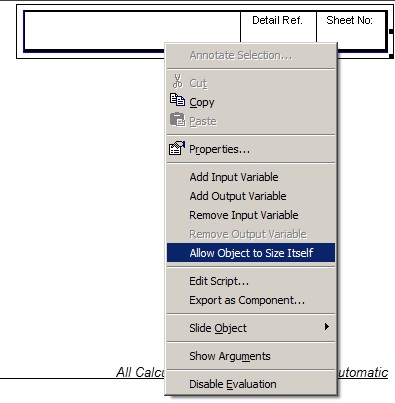
However, I accepted the fact that there is no 'fix,' so (as an alternative) I developed a header/footer that uses PowerPoint. This works great (no popup windows or nothing to date), BUT I've noticed that Computers with PowerPoint 2013 installed likes to INCREASE the size of the PowerPoint objects when the file was last saved on a computer with PowerPoint 2010 & Computers with PowerPoint 2010 installed likes to DECREASE the size of the PowerPoint objects when the file was last saved on a computer with PowerPoint 2013. Is there a way to suppress this resize? Note that unchecking “Allow Object to Resize Itself" has no influence on this behavior.

============= SUMMARY: =============

1) Is it possible to Suppress Excel Windows From opening for Every Embedded Excel object?

2) Is it possible to suppress the 'resize' of an embedded PowerPoint object between computers w/ PowerPoint 2010 & 2013 installed?

3) If there is no solution for (1) or (2), is there another object that could be embedded to act as a header/footer? (msFlexTable doesn't work, InputTable lacks aesthetics and manipulation, Mathcad Matrixes lacks aesthetics and manipulation)

4) On a side note, is it possible to program the locations of embedded objects/regions? I am familiar with the "x" and "y" properties of a region located in a Mathcad worksheet, but these properties are read-only, correct? How would one proceed to automate moving a 'region' to a specific location (in vbscript)?

====================================

(NOTE: I have tried embedding a Mathcad object and that works fine for manipulation, but the aesthetics are poor and the runtime is too long.)

Thank you,

-Lemens
Best answer by Lemens

I think I found the solution: Apparently, unchecking "Allow Object to Resize Itself" DOES work. I don't know why it didn't work the first time I tried it, but it works now (forgot to save the change before testing, maybe?) This prevent the object for increasing/shrinking as I've indicated earlier.

Recap of What I found:

-Excel -> Prompts a BUNCH of msgboxs/windows

-Word -> Works (Didn't test this too much, might be better to use then powerpoint for header/footer)

-powerPoint -> Works, but the minimum slide height is "1 inch", so the entire object needs to be resized if a 0.5" tall object is required (as opposed to just reformating the slide height when editing the ppt object.

-OpenOffie -> content didn't display on my screen; could edit data but couldn't print from the mathcad sheet - openOffice document showed up as 'blank'.

EmbedObjSolution.jpg

2 replies

Lemens1-VisitorAuthor
1-Visitor
January 28, 2014

Greetings,

I believe I solved my issue... if you embed the powerpoint object in a mathcad sheet, and then embed that mathcad sheet into another mathcad sheet, it will prevent the powerpoint object from resizing, but still allow vbscript functionality. Only problem is that you will be unable to manually edit the powerpoint object once you embed it twice. I'm still testing this method, but it seems to be working so for...

In addition, I found out that you can print off a flexgrid table. If you embed said table into a mathcad sheet inside a mathcad sheet, a 'low quality screen capture' of sorts is taken on the msFlexgrid, but it DOES print (whereas it will not).

Thank you,

-Lemons

Lemens1-VisitorAuthor
1-Visitor
January 29, 2014

Greetings Program,

I cannot help but get the feeling that I am talking to my self, but here is my latest find:

Embedding a Powerpoint Object in A Mathcad Object within Mathcad works, however I found that if you close the Mathcad application, and then try to reopen the worksheet under question, it fails to load the desired regions. What I have been forced to do is terminate the process in the task manager (yes, there is a mathcad process running when mathcad exits with this embedded embedded structure going on). Once I terminate this process, then I can open up the mathcad file under question with no problems. Whereas my colleagues will find this annoying, I may be forced to stay with the automatic resizing of the region.

Also, when you have an embed mathcad object withing mathcad.... it seems as if it is a worksheetsCollection object; the only way I've found out how to access the embeded mathcad object was to access ScriptObj.Worksheet.setValue(xxx,xxx) Is this the wrong way to access this object? Does it create a new mathcad process? Can I terminate this process when I close that particular mathcad sheet. Hhhmmm...

Thank you,

-Lemens

Thank you,

12-Amethyst
January 29, 2014

HI ,

If you attach a working example of your sheet, you are very much more likely to receive an answer.

Questions like this one are usually beyond our direct experience but might have similarities to issues already experienced (scripted object, XL sheet etc. rather than power point) .

From what you have said it sounds similar to the positioning of regions in general - they do seem to move a little - I compare worksheets side by side & am always adjusting line spacing.

It would be ideal if, as you say, the worksheet could remember the exact position & size of every object : (PTC) -> its not rocket science...

As to the instance of mathcad continuing to run, probably the closing routine is failing in some unexplained manner leaving your copy of mathcad running in the background. I've experienced this from time to time usually when mathcad has reported "an error has occurred, please save your work and exit", these instances have usually been un-repeatable so not as easy to debug / report either on this forum or to PTC directly.

If your sheet makes it repeatable then this could be a small step forward.

Regards

Andy

25-Diamond I
January 29, 2014

Which version and which maintainance release of Mathcad this question belongs to?

Some older versions were "famous" for staying in memory after closing (MC14 M035 comes to mind).

Lemens1-VisitorAuthor
1-Visitor
January 29, 2014

My computer has Mathcad 15.0 (15.0.0.436). As for all of the other computers in the office, I assume the same version is installed on them.

25-Diamond I
January 29, 2014

Kenny Lemens wrote:

My computer has Mathcad 15.0 (15.0.0.436). As for all of the other computers in the office, I assume the same version is installed on them.

That doesn't seem to be the most current version, which should say

Mathcad 15.0 (M030 [MC15_M030_20131216])

in the "About" box.

But I guess your problems do not relate to a bug which is fixed in the current release. Nevertheless it might be agood idea to use the most current release, if possible.