17-Peridot
March 20, 2014
Solved

Label inside a 2D plot

  • March 20, 2014
  • 4 replies
  • 4150 views

Hi all,
I use MC15 and my question is "how you can write a label/tag near a specific point on a graph".

Example: I have a function f(x) and I want to write something near the point f(x=26).

Regards

Best answer by AlanStevens

You can do it (in a rather unsatisfactory manner) by writing your label in a text box and then dragging this onto the graph, as has been done in the image below. You can't get Mathcad to label points automatically though.
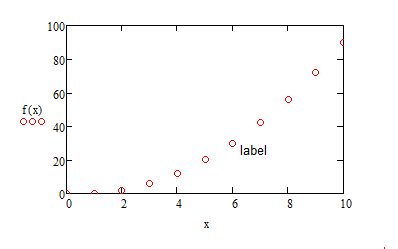
label.PNG

Alan

4 replies

19-Tanzanite
March 20, 2014

You can do it (in a rather unsatisfactory manner) by writing your label in a text box and then dragging this onto the graph, as has been done in the image below. You can't get Mathcad to label points automatically though.

label.PNG

Alan

23-Emerald I
March 20, 2014

You can insert an EXCEL component into version 15, pass data to it and create the graph in EXCEL (which gives more graphing flexibility.

gfraulini17-PeridotAuthor
17-Peridot
March 20, 2014

Do you know if this is possible on MathCad Prime 1,2,3 ?

25-Diamond I
March 20, 2014

Giulio Fraulini wrote:

Do you know if this is possible on MathCad Prime 1,2,3 ?

No, in Prime you don't even have the ability to add a plot title, axis labels or a legend. You are supposed to use text boxes even for those things.

23-Emerald V
March 20, 2014

Another possibility is to use the Amazing Images eBook routines. See thread http://communities.ptc.com/community/mathcad/mathcad-usage/blog/2010/05/27/creating-amazing-images-with-mathcad-14 for details on downloading