19-Tanzanite
April 26, 2023
Question

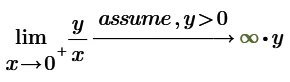
Limit does not take into account the assume keyword...Or?

  • April 26, 2023
  • 2 replies
  • 1294 views

Hello,


CornelBejan_0-1682521231087.png


In the end, the result should not be:

CornelBejan_2-1682521701818.png

?


The calculation was made in Mathcad Prime 8.

2 replies

25-Diamond I
April 26, 2023


In the end, the result should not be:

CornelBejan_2-1682521701818.png


not?? Why not?


"assume" never was reliable and satisfying.

But in this case it seems that it got worse, as the old symbolic in P6 returns the simple result

Werner_E_0-1682523713374.png


Cornel19-TanzaniteAuthor
19-Tanzanite
April 27, 2023

CornelBejan_1-1682575337971.png

CornelBejan_2-1682575369383.png


CornelBejan_3-1682575378010.png

CornelBejan_4-1682575384845.png

Mathcad Prime 8 cannot calculate such kind of limit...


And assume does not work in Mathcad Prime 8 (at least for this kind of problem)...

CornelBejan_6-1682575508726.png

CornelBejan_7-1682575618512.png


Any workaround for Mathcad Prime 8?

25-Diamond I
April 27, 2023


Any workaround for Mathcad Prime 8?


None that I would be aware of apart from using the absolute value or the square for variables which are considered to be positive

Werner_E_6-1682581562614.png        Werner_E_0-1682581077569.png          Werner_E_1-1682581085482.png

Erroneously Prime does not distinguish between y=0 and y!=0 here.

Only correct answer so far by MC11 with Maple, shown by Luc.

You may consider reporting this bug/inability to PTC support.


BTW, sometimes "assume" actually IS respected and works as expected 😉

Werner_E_2-1682581419447.png                    Werner_E_3-1682581424803.png

Werner_E_4-1682581429989.png                    Werner_E_5-1682581435395.png


23-Emerald IV
April 26, 2023

Guess you're right:

LucMeekes_0-1682543316937.png

Success!
Luc