
3-Newcomer
August 24, 2012
Solved

Mathcad 15: Display as table or matrix

  • August 24, 2012
  • 2 replies
  • 9597 views

Windows 7 x64, M15 010

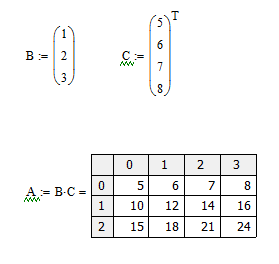
I multiplied a 3x1 matrix by a 1x9 and got the result. Wanted to display as a table, not a matrix. Used A:=B*C=

Even though I could then /select/ the table option, it would not display. I had to use A=

This is prolly well known, but I couldn't find the correct buzzwords during search to turn it up. I have not tried this technique in a while, but was sure that I used it in M14/15 on XP Pro x32.

~R~
Best answer by AlanStevens

First do B*C= and format the result as a table. Then add in the A:= part. e.g.

TableDisplay.PNG

2 replies

19-Tanzanite
August 24, 2012

First do B*C= and format the result as a table. Then add in the A:= part. e.g.

TableDisplay.PNG

Ninetrees3-NewcomerAuthor
3-Newcomer
August 24, 2012

Y'know, when I glanced at what you wrote, I thought "Yeah, that's what I did!" Then I read it again...yes, these exact steps solve the problem...who'd a thought?!? Thanks!

~R~