
1-Visitor
June 3, 2011
Solved

MathCAD 15 Runtime Error

  • June 3, 2011
  • 1 reply
  • 9108 views

I just purchased and downloaded MathCAD 15, however every time I try to open the program, it responds with a runtime error message saying:

Runtime Error!

Program: C:\Program Files (x86)\Mathcad\Mathcad 15\mathcad.exe

This application has requested the Runtime to terminate it in an unusual way.

What does this mean? I'm new to MathCAD and I'm excited to learn this program, but this is frustrating!!! Has anyone seen this error before? I appreciate any and all help! Thank you!!!
Best answer by VladimirN

Hello!

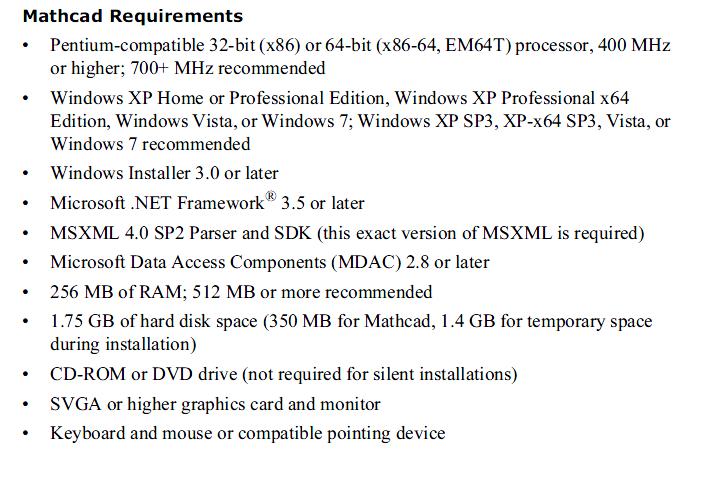
On the PC following programs should be installed also ((data from "Mathcad Requirements")):
• Microsoft.NET Framework® 3.5 or later.
• MSXML 4.0 SP2 Parser and SDK (this exact version of MSXML is required).
• Microsoft Data Access Components (MDAC) 2.8 or later.

Mathcad_15_Requirements.jpg

1 reply

VladimirN24-Ruby IIIAnswer
24-Ruby III
June 3, 2011

Hello!

On the PC following programs should be installed also ((data from "Mathcad Requirements")):
• Microsoft.NET Framework® 3.5 or later.
• MSXML 4.0 SP2 Parser and SDK (this exact version of MSXML is required).
• Microsoft Data Access Components (MDAC) 2.8 or later.

Mathcad_15_Requirements.jpg

1-Visitor
June 3, 2011

VladimirN,

Thank you for your quick reply and help! You'll have to forgive me, I'm not very tech savvy, is there a simple way to check if my computer has Microsoft.NET Framework® 3.5, MSXML 4.0 SP2 Parser and SDK, or Microsoft Data Access Components (MDAC) 2.8 or later? I think (not sure though) my computer only has Microsoft.Net Framework 2.0 and when I tried to download Framework 3.5, it didn't work, it said there was an installation error, any thoughts? Again, thank you for your help.

Dan

24-Ruby III
June 3, 2011

Daniel,

On what operating system (Windows) you work?