

1-Visitor
April 11, 2019
Solved

Mathcad 15, using the function "Find" in a for-loop

  • April 11, 2019
  • 4 replies
  • 5244 views

Hello all,


I want to solve an equation of one variable in combination with a for-loop.


In the appendix I added an example of this problem.

How can I solve this?


Thanks in advance!

Best answer by Werner_E

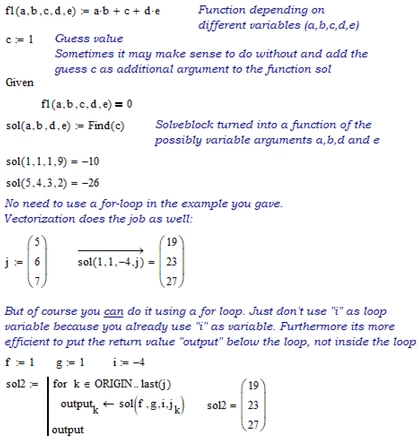
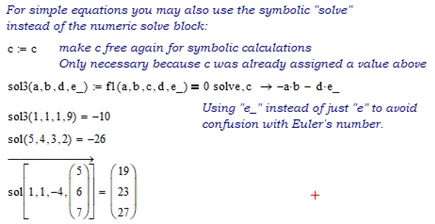
The question is already four months old, but if there is still interest, find attached a way which uses your example and also a way to use the symbolic solve command instead of the numeric solve block.
B1.png

B2.png

MC15 worksheet attached

4 replies

24-Ruby III
August 19, 2019
23-Emerald IV
August 19, 2019

The function Find() can ONLY be used in a solve block.

Read the (online) manual (Mathcad help) from the menu.


Success!
Luc

23-Emerald I
August 19, 2019

If you set up your Given/Find block as  function--Ans(x):=Find(y), then below the solve block Ans(X) = will run the solve block for that value (X) and return that solution (Y).  This function can now be embedded in a for loop to return a series of solutions.

Werner_E25-Diamond IAnswer
25-Diamond I
August 19, 2019

The question is already four months old, but if there is still interest, find attached a way which uses your example and also a way to use the symbolic solve command instead of the numeric solve block.

B1.png

B2.png

MC15 worksheet attached