Solved
MathCAD Prime 10 - TextBox Advanced Controls - Output Type
Hi all,
The advanced controls are a dream come true for me, but has probably opened up a rabbit hole of documentation.
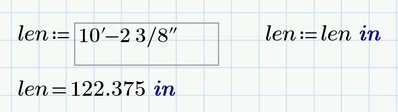
I added a textbox with the intent that users could enter dimensional strings in a user-friendly format like:
10'-2 3/8"
and the output would be an inches value of
122.375
I'm having two issues, first being the output is a string "122.375" and not a numerical value, and ideally the value would actually be defined with MathCAD's units: 122.375*in
Any assistance on how to get this working would be appreciated
function TextBoxEvent_Start(Inputs, Outputs) {
 // TODO: Add your code here
};

function TextBoxEvent_Exec(Inputs, Outputs) {
 var input = TextBox.Text(); // Get the input value from the first input
 var inches = parseDimension(input); // Convert the dimensional string to inches
 Outputs[0].Value = inches.toFixed(3); // Output the value in decimal inches to 3 figures
};

function parseDimension(dim) {
 var parts = dim.split("-"); // Split the string by feet and inches parts
 var feet = parseFloat(parts[0]);
 var inches = 0;

 if (parts.length > 1) {
 var inchesParts = parts[1].split(" ");
 if (inchesParts.length > 1) {
 inches += parseFloat(inchesParts[0]); // Convert feet to inches
 var fraction = parseFraction(inchesParts[1]); // Convert fraction to inches
 inches += fraction;
 } else {
 inches += parseFloat(inchesParts[0]);
 }
 }

 return feet * 12 + inches;
}

function parseFraction(fractionStr) {
 var parts = fractionStr.split("/");
 if (parts.length === 2) {
 return parseFloat(parts[0]) / parseFloat(parts[1]);
 } else {
 return 0;
 }
}

function TextBoxEvent_Stop(Inputs, Outputs) {
 // TODO: Add your code here
};
.