1-Visitor
August 17, 2021
Solved

Mathcad Prime Copy to Word in Vector Format

  • August 17, 2021
  • 1 reply
  • 4851 views

Hi everyone,

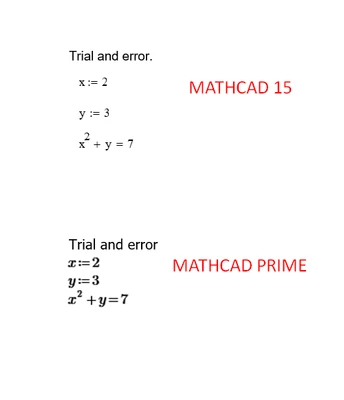
I started Mathcad with Prime without knowing the all extra functionalities Mathcad 15 has. Please see the following screenshot. If I copy and paste Mathcad 15 lines and paste into the Word, result is perfect, everything is clear and it seems like vector image since I can resize it.

If I copy and paste Prime lines, it is awful. I cannot put that in my report like that. Same result with rtf export. PDF export is better, but I have to include those in my report.

So, I know this comment is made thousand times in this forum, but how PTC can think removing too many functionalities and features is a good idea? I mean almost everybody uses Mathcad to supplement reports. I would like to hear your user experience too. Do you only attach your report as PDF?

Is there anyway to get the calculations to Word from Mathcad? (I know the answer, no.)
BD_10012966_0-1629215336973.png


Best answer by LucMeekes

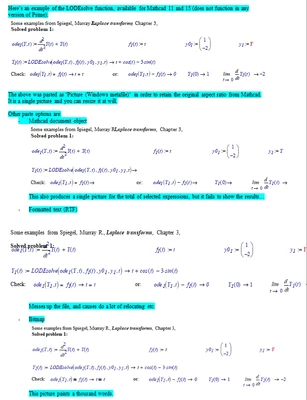
I generally NOT use Prime, but Mathcad 11. That's unfortunately not an option for you, but you (still) can use Mathcad 15, which should be capable of similar options as shown below (a screenshot of a page in MsWord I just assembled, the text I typed in MsWord is on a blue background):

LucMeekes_1-1629295605940.png


As you will guess, I generally use the first option.

The 'Mathcad document object' fails to show results probably because I have automatic calculation turned off by default. This option embeds the Mathcad sheet file into the MsWord document. Now if you have several pieces of a single Mathcad sheet that you want to put scattered over your MsWord file, you are embedding the same sheet several times, each time with a different view on the embedded sheet. I think that's a problem. The other point is that if you resize the 'picture' (= the view window), the Mathcad regions start to move.


The picture in this forum isn't as sharp as I see it on the screen. The MsWord file is attached, so you can see for yourself.


Success!
Luc

1 reply

17-Peridot
August 18, 2021

Hi,


I'm using Mathcad 15 to prepare my reports. You can export Mathcad 15 files as a rtf file and import it in word but this works only if you do not have controls in the work sheet as these get jumbled during import.

Anyhow, you must prepare to shift lines and equations into the right place within the word sheet therefore I recommend this procedure only for short reports. So the answer is yes, attach your calculations as a pdf. PTC didn't bother to rectify this in Mathcad 15 and prime is even worse.

1-Visitor
August 18, 2021

Hi, thanks for the answer.

As I have shown in the screenshot in the post, Mathcad 15 behaviour is more than OK for me. Because the copy and paste results in vector graphics - so high quality. For Mathcad Prime, it is not the case. Again, as you can see in the screenshot, it looks awful. 

23-Emerald IV
August 18, 2021

I think 'awfull' expresses a sense of (dis)taste, and taste is a debatable matter. Prime copy to MsWord paste can only be done as a bitmap. As long as you don't mess with that bitmap (keep it the same size and aspect ratio) the result may be OK, although the edges of the font characters are not as sharp as you might want. You should try changing the font (in Prime), this is Times New Roman:

LucMeekes_0-1629291053252.png

instead of the default:

LucMeekes_1-1629291151588.png


Success!
Luc