
1-Visitor
June 6, 2014
Question

MathCAD producing "internal error" in programming block.

  • June 6, 2014
  • 2 replies
  • 2523 views

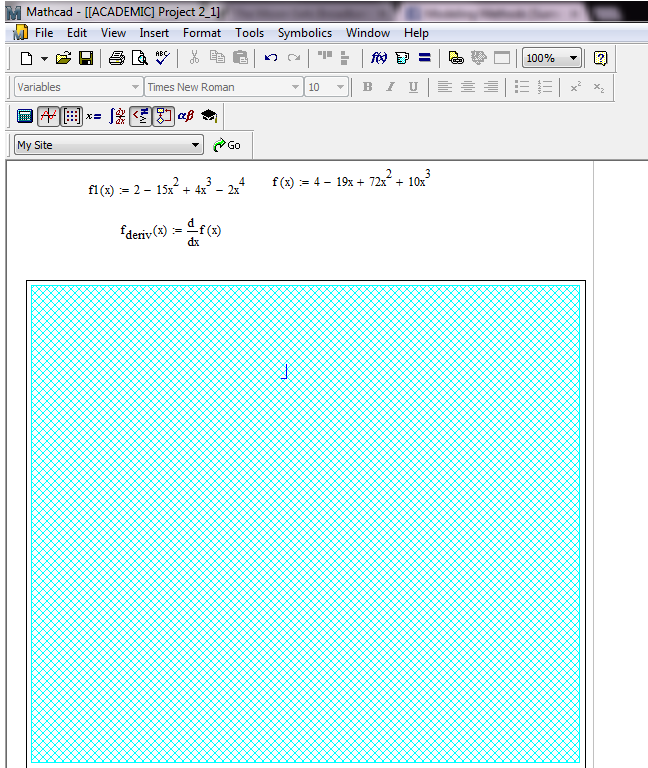
I have MathCAD 15 (M030 [MC15_M030_20131216]) running on a 64 bit Windows 7 laptop with 8gb of RAM and an Intel Core i3 processor. When I run programs that reach a certain length, the whole block turns into a blue mesh. It still works, and the subsequent calculations are good, but I am unable to edit the block. It was discovered earlier today that I could get rid of it by pressing pg up or pg dn (not by scrolling), but it returns again. I've been able to perfectly run the code on every other computer I've tried it on. I've included a screen shot of how it looks and have attached the worksheet. Thanks in advance for any help.
mathcad.png

2 replies

19-Tanzanite
June 6, 2014

It runs ok for me: MC15 (F000) 64 bit Windows 7 laptop. No blue mesh.

Alan

24-Ruby III
June 6, 2014

The same for me with no problem on:

* Win7 32-bit MC15 M030,

* Win7 63-bit MC15 F000.

I resave your worksheet in Mathcad 15 M030 it may help you.

1-Visitor
June 6, 2014

Thanks for your help everyone. The weird thing is I changed the document slightly before I uploaded it, it just had a heading for my class and all the subscripts of h were originally my intials, dws. It works for me since I've changed it. I tried the changes one at a time and replacing all the subscripts in that document seems to fix it. That just seems really strange to me. And I'm able to confirm that making those changes fixed other documents as well. Does anyone know why this might be?

25-Diamond I
June 6, 2014

. Does anyone know why this might be?

Guess no, until you are able to post a sheet which shows that error.

1-Visitor
June 6, 2014

Here's the original file that's giving me problems. Unfortunately, I haven't been able to repeat the error on any other computers. A friend of mine was able to run it flawlessly on his laptop with less RAM (4gb) and a less powerful processor. However, he was using MathCAD 14. Also, it seems to work fine when I convert the worksheet to work with Prime 3, and run it on Prime 3 on my computer.