
1-Visitor
May 4, 2015
Question

Mathcad15 - Help with Functions

  • May 4, 2015
  • 2 replies
  • 3723 views

Hi - I'm not sure if I am doing this correctly - my question I am working on is :
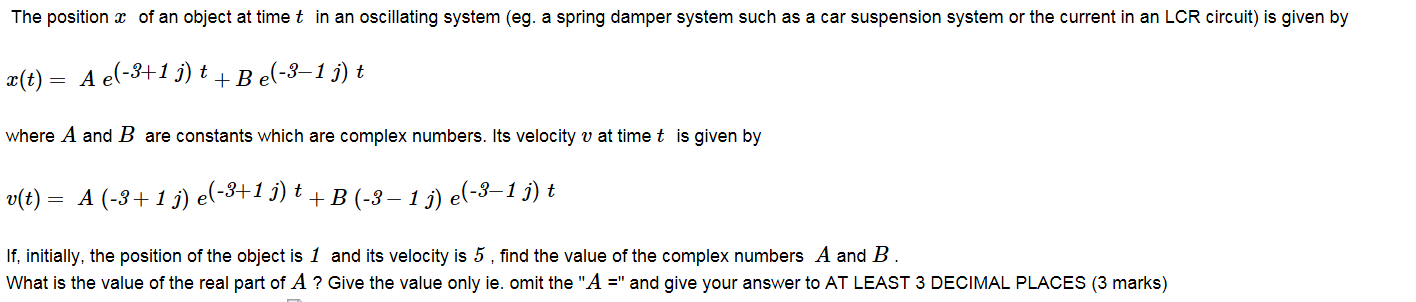
So I know that x(t) = 1 when t=0, and V(t)=5 when t=0, so I use x(t)=1 on the 1st Equation and Solve for B so I get B=1-A

then I substitute 1-A for B in equation 2, set v(t) equal to 5 and t=0, Solve for A ......

However I'm not getting the correct answers so don't know what I'm doing wrong - can anyone help me on this one please ?

thank you

2 replies

19-Tanzanite
May 4, 2015

Pleas post a worksheet showing what you have done (click on "Use advanced editor" at the top right of the edit dialog).

ccoldham1-VisitorAuthor
1-Visitor
May 5, 2015

Ok I will do this this evening - thank you

ccoldham1-VisitorAuthor
1-Visitor
May 5, 2015

Hi Richard - I couldn't find the Use Advanced editor sorry - it's gone from bad to worse for me now as I tried to Solve for B but can't - I know that if I sub t=0 in for t then e^0 = 1 but I don't want to have to manually put that in like that. So I'm stuck

Would appreciate any help that you can give - thanks Christine.

23-Emerald I
May 5, 2015

To input a complex number, say 5 + 3 j, you have to type the following:

5 + 3 * 1j

The 1j (or 1i) is typed with no multiplier; this tells Mathcad that you're inputting an imaginary number.