1-Visitor
January 25, 2013
Solved

matrix and programming

  • January 25, 2013
  • 4 replies
  • 6611 views

Hi all,

need some help again.

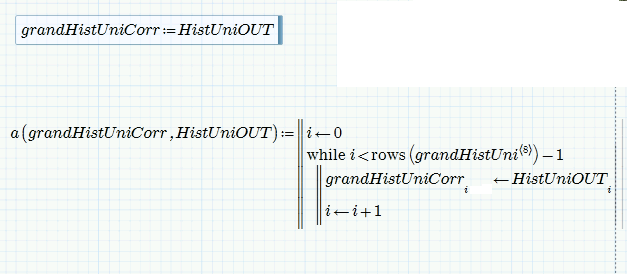
How do I achieve the same thing the first expression does with a programming loop?

matrix 1.PNG

I added my "solution" but something is missing.

The final goal will be of course to add some conditions inside the loop but I can't get even this working.

Thanks

Best answer by Werner_E

Right click at the upper left right corner and chose extended editor. Now you can add files to your post. You are not limited to Mathcad worksheets .

I've missed your question about the two vectors. If you need to change values in both vectors I would keep them (or bring them via augment) in a nx2 matrix which then would be the output of the function.

As I understand your second vector does not change, so your function has two input argument - the second vector as condition, the first providing the values - and one result - the changed vecor, which you may assign to a new varible or back to the first again. See examples for inverting and ignoring the unwanted values. In the first values over 2.5 are inverted, in the second only values <= 2.5 were put in the result vector.
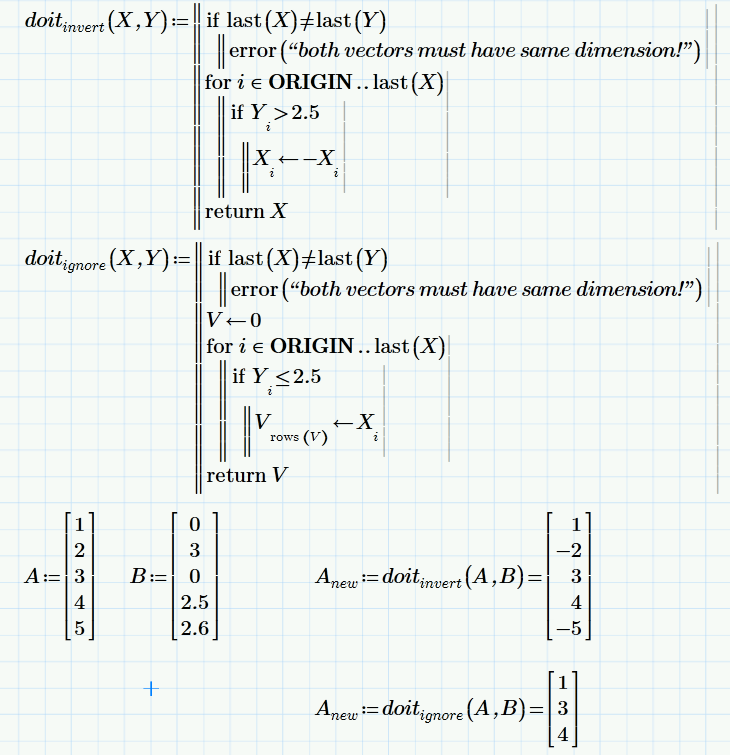
matrixprog1.png

Of course you could do it without a function as in your first post but I usually try to keep things nice and tidy and as selfcontained as possible. Somewhat shorter but not that versatile and the names of the vectors A, B cannot be changed unless you change the proram, too.
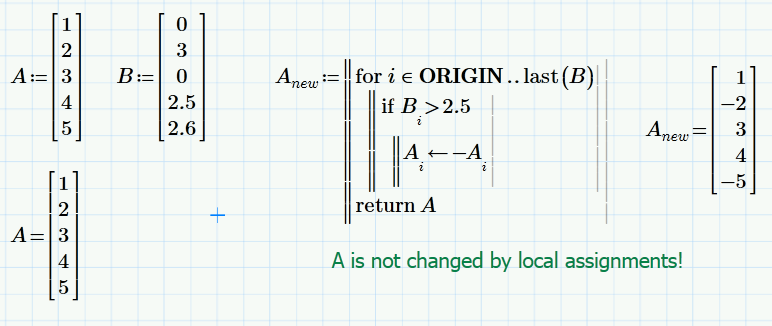

matrixprog2.png

4 replies

25-Diamond I
January 25, 2013

When asking here it helps a lot and makes people more willing to work on your concern if you post a worksheet - preferably shrinked down to the barebones to make it easier for all of us.

It seems you want to copy one variable into another, presumably a twodimensional matrix. Doing it element by element you would use nested for-loops.

Are you looking for something like this:

zuweis1.png

1-Visitor
January 28, 2013

Hello,

I have 2 vectors, to follow your example let's say it is A and F.

In your example, if I wanted to replace "9" with a value in F (my condition vector), how do I do this?

I would have to write for example:

a(Y, C):= ....(FOR loops)

But then B:=a(A) wouldn't work anymore. And B:=a(A,F) doesn't make sense because I want B also to be a vector and not a matrix.

Thanks

1-Visitor
January 25, 2013

Your loop has no output.

Try renaming the input variables of the function x1 and x2. Once the loop finishes, the variables used in the loop do not exist.

What are you trying to do?

1-Visitor
January 25, 2013

Thank you both for your answers. I'm going to continue working on this on monday.

Werner, thanks for the hint regarding the worksheets. I'll do that for future posts.

You're right, I want to copy one variable into another. There will be some conditions for doing that, that's why I want to use a programming loop.

The nested FOR loops look promising, I'll try that.

Regards

25-Diamond I
January 26, 2013

You're right, I want to copy one variable into another. There will be some conditions for doing that, that's why I want to use a programming loop.

That was the reason I let the routine replace every number >9 by "too big" and every 0 by 100. You might consider doing the datamanipulation outside in an extra function, depending on what the conditions are.

The nested FOR loops look promising,

Depends upon what you are trying to achieve. Your program looked like you are trying to copy anumber of rows determined by a third matrix from one Matrix to another.

According my routine you probably know the the use of ORIGIN serves the purpose of being independent from what ORIGIN is set to (Default: 0). Some people feel more comfortable with ORIGIN set to 1 and use routines which assume the default 0. Usually that means trouble.

1-Visitor
January 28, 2013

Ok, maybe somebody can bring me on the right track.

It seems I cannot add a csv here? Only pictures, links and videos? My csv has 2 columns. Whenever the value in the second column is higher than 2.5 I want the value in the first column to be inverted (or ignored).

I had the two columns of this matrix assigned to two vectors, therefore my previous question how to pass two vectors to the programming function if I only want to change one of them.

sensor+outp+vs+SR.PNG

Werner_E25-Diamond IAnswer
25-Diamond I
January 28, 2013

Right click at the upper left right corner and chose extended editor. Now you can add files to your post. You are not limited to Mathcad worksheets .

I've missed your question about the two vectors. If you need to change values in both vectors I would keep them (or bring them via augment) in a nx2 matrix which then would be the output of the function.

As I understand your second vector does not change, so your function has two input argument - the second vector as condition, the first providing the values - and one result - the changed vecor, which you may assign to a new varible or back to the first again. See examples for inverting and ignoring the unwanted values. In the first values over 2.5 are inverted, in the second only values <= 2.5 were put in the result vector.

matrixprog1.png

Of course you could do it without a function as in your first post but I usually try to keep things nice and tidy and as selfcontained as possible. Somewhat shorter but not that versatile and the names of the vectors A, B cannot be changed unless you change the proram, too.

matrixprog2.png

1-Visitor
January 28, 2013

Thanks a lot Werner, I'll try out the For-loops as well.

I'm still doing babysteps with Mathcad.