
15-Moonstone
December 21, 2021
Solved

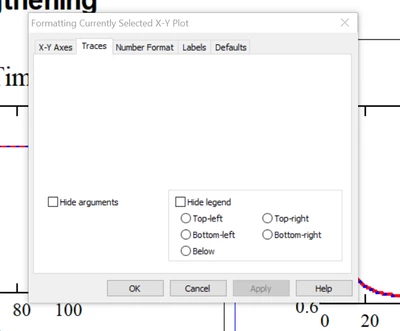
MCAD 14 Crashes in Plot Format

  • December 21, 2021
  • 3 replies
  • 17437 views

I am still using MC 14.0. I had to re-install it because the motherboard on my computer went bad. Now, when I go to the Trace tab in plot format it comes up blank and clicking on anything but cancel crashes the program. Other tabs are fine. I installed the M020 release but that did not help. 

Any suggestions?
 

JohnRudnicki_0-1640130426248.png


Best answer by JohnRudnicki

Thanks to all who offered suggestions. The (or, at leas, a) solution turned out to be incredibly simple. When my computer guy tried to install M020, he unpacked the files to a location that was different from the default. M020 then installed without difficulty and for reasons that he did not know (and I certainly do not) that solved all the problems.

3 replies

24-Ruby III
December 22, 2021

 Hi,


What Windows OS are you using?

15-Moonstone
December 22, 2021

Windows 10 although I was also using that before I had to re-install MC14.

24-Ruby III
December 22, 2021

1. Try to repair it Mathcad 14: "Control Panel" --> "Programs and Features" --> right click on Mathcad14 icon and select "Repair".  When ask for Mathcad14WixInstaller.msi browse for it: Mathcad14_EN folder -> Mathcad -> Mathcad 14.0 M020.msi.

2. The following Microsoft add-on requirements also apply:


Pic-1.png


23-Emerald IV
December 22, 2021

Hi John,


It appears that there is a Mathcad14 M35:

https://www.ptc.com/en/support/refdoc/Mathcad/14.0/Mathcad_14_M035_RELNOTES_HTM_98347

But I see no fixes in M30 or 35 that (directly) relate to your problem.


I assume you have the prequisites installed:


  • Windows XP Home or Professional Edition, Windows XP Professional x64 Edition, or Windows Vista; Windows XP SP3, XP-x64 SP2, or Vista recommended
  • Windows Installer 3.0 or later
  • Microsoft .NET Framework® 3.5 or later *
  • MSXML 4.0 SP2 Parser and SDK (this exact version of MSXML is required ) 
  • Microsoft Data Access Components (MDAC) 2.8 or later 

Success!
Luc


15-Moonstone
December 23, 2021

HI Luc,


Thanks for the suggestions but I am having more problems rather fewer. I tried to install M35 update but the link in the release notes took me to a page that said "Nothing here for you to see - the page you are looking for does not exist." I tried the PTC chatbox on the page, but did not get any response - at least until now (~36 hours later). Another problem (see post on displaying an array) cropped up and Werner thought I have a faulty installation. So I uninstalled MC14 but now cannot re-install it at all. I keep getting the message "some files could not be copied - close all apps, reboot windows and try again." I did that several times, to no avail. I am using Windows 10 and successfully installed MC14 a few years ago when I had to get a new machine, so I think I have your "prerequisites" but how would I verify this? I searched on MXSML and there  were many. MXSML SP2 is no longer available from Microsoft.


Any other suggestions?


In any case, have a happy holiday!

23-Emerald IV
December 23, 2021

John,


Can it be that you're bitten by the bitness of Windows?

Was your previous Win10 a 32 or 64-bit edition? I suppose that with a new MotherBoard, and reinstall of Windows 10, you're now running the 64-bit edition.

Note that Mathcad 8 through15 are 32-bit applications, so chances are they require the 32-bit MSXML.


Success!
Luc

1-Visitor
December 23, 2021

Look like you are having a same problem as me!

15-Moonstone
December 23, 2021

What version of MathCad are you using? I am using MathCad 14. I had some problems a while ago when I had to install it on a new computer, but using the patch to version 020 solved them.