You didn't include the faster routine without using stack. But you are right, without stack the routine is MUCH faster! I don't know why - you would expect built-in routines to be more efficient than self written loops.
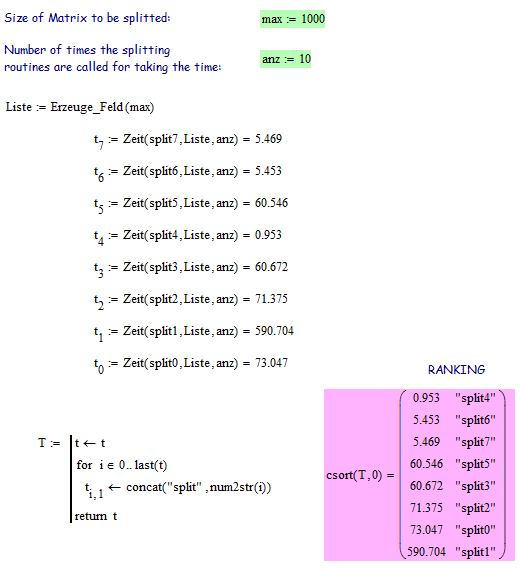
In the attached sheet you find 8 different split-routines. I have no idea how I could judge memory consumption other than watching process mathcad.exe in task manager which would be very unreliable, to say the least. So I have concentrated on time taking. In the pic you see the calculation times needed for splitting 10 times a 1000x1000 matrix.
The splitting routines:
split0: is your original program
split1: damp sqib; here I tried to replace the row selection from submatrix to a transpose/column/transpose combination and the routine went a lot slower (factor 10!). Transposing the whole matrix for every row obviously does cost a lot of time
split2: went back to submatrix but included some improvements (getting rid of if/oherwises, unnecessary submatrix,..) Does not do much better and in the last runs I could not duplicate the double speed of this rotine which I mentioned in the file.
split3: transpose the matrix and work column-wise instead of row-wise. That way we can use the column selector. Very slight improvement of calculation time
split4: The lonely winner! Unfortunately we are cheating here, as this routine does return nested vectors. To access a single number you would have to type M[ispace[0,j instead of M[i,j. So it does not count
split5: Trying to use split4 but "flattening" the result to get the desired matrix. flattening uses stack, so again big slow down.
split7: Using method of split4 and a flattening routine which replaces stack by for loops. More or less ex aequo with split6
split6: usually number one in time ranking (not counting split4). stack, augment, submatrix replaced by for loops. As you wrote this is much quicker (factor 10 to 12) - strange.