
1-Visitor
March 17, 2011
Solved

Nested if Statements

  • March 17, 2011
  • 1 reply
  • 25250 views

I need to do some nested if statements for conditional programming and I cannot figure out for the life of me how to nest if-statements using the programming toolbar. I am in Matcad 14 and the "add line" button just adds if-else if statements, I need to nest. All the "add line" option does is just add another line on the same logic level. Is there a difference between if and conditional if?

I posted a flowchart of the basic program logic. (Ignore the red lines, that is just my spell checker)
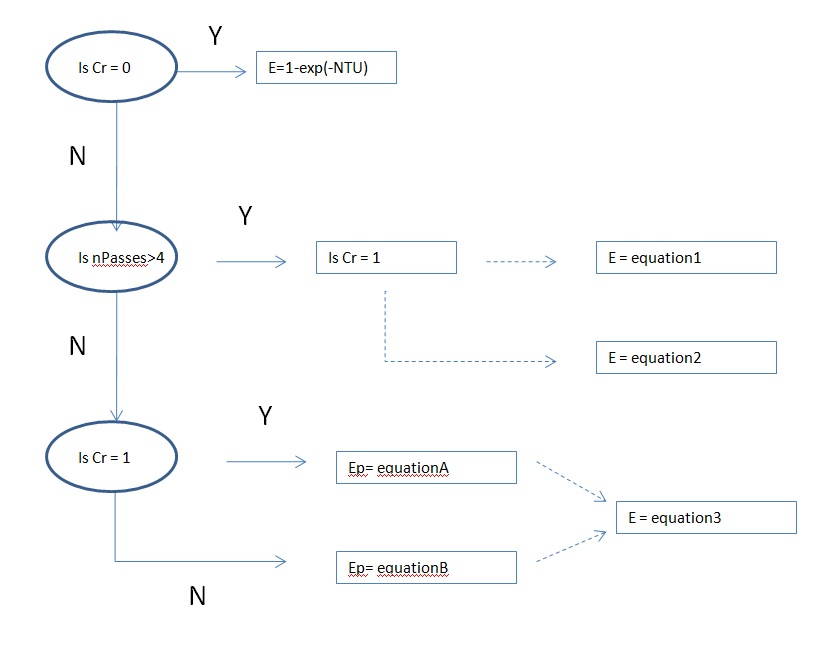
flowchart.png

Best answer by RichardJ

When you enter the if there are two placeholders, one before the if (where the statement to be executed goes) and one after the if (where the condition goes). The cursor should be on the on before the if, but if it isn't then select that placeholder. Add a line using the programming toolbar, and the structure of the if statement will change so that you have a block of statements below the if. Now you can add another if as one of those statements. As long as you always have more then one line in the statement block the structure of the nested if is clear. It's not actually necessary to have more than one line, but the structure is impossible to figure out if you don't (as you have discovered!).

1 reply

19-Tanzanite
March 17, 2011

It's very hard to figure out the structure of nested if statements if they only have one line in the statement block. After adding an if, add a second line to the block. Then add the next if, and so on.

BTram1-VisitorAuthor
1-Visitor
March 17, 2011

So I can't do something like this?

nestedif.png

I found this through google in a Mathcad primer PDF. The problem is I physically can't figure out how the keystokes to get just "if .......". The only if statement I can find is through the programming logic which is "......... if .............", and even then I can't figure out how to nest them. Thanks.

RichardJ19-TanzaniteAnswer
19-Tanzanite
March 17, 2011

When you enter the if there are two placeholders, one before the if (where the statement to be executed goes) and one after the if (where the condition goes). The cursor should be on the on before the if, but if it isn't then select that placeholder. Add a line using the programming toolbar, and the structure of the if statement will change so that you have a block of statements below the if. Now you can add another if as one of those statements. As long as you always have more then one line in the statement block the structure of the nested if is clear. It's not actually necessary to have more than one line, but the structure is impossible to figure out if you don't (as you have discovered!).