
1-Visitor
November 10, 2020
Solved

Nested Input Values and Equations

  • November 10, 2020
  • 1 reply
  • 1833 views

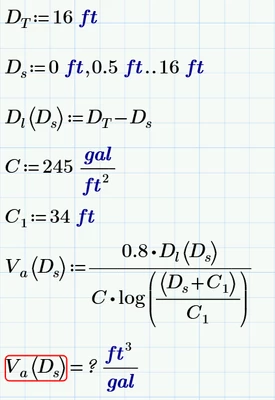
First time poster, casual user of MathCAD Prime 6.0, and have a question regarding setting up an equation that has multiple variable inputs (X = 1....100, 10; Y = 2...12, 2; Z.....) and present a table of the input versus output results for the given inputs.    

The equation is pretty simple but I'm struggling to figure out 1) what I am missing to make it work and 2) to display a table that would show those inputs versus the output.  Its probably something simple but it's eluding me.
KG_8294030_0-1605041103974.png


Best answer by SL_9674672
It is a divide by zero problem. Use a non-zero starting point for your range variable D_s. The log of 1 is zero. C*zero is zero. i.e., Ds=0, so log((0+134)/134) = log(1) = 0. You could also add a small addition to the numerator of the log function, but it will affect your results. I can't get the file to attach, nor a screenshot.

1 reply

1-Visitor
November 11, 2020
It is a divide by zero problem. Use a non-zero starting point for your range variable D_s. The log of 1 is zero. C*zero is zero. i.e., Ds=0, so log((0+134)/134) = log(1) = 0. You could also add a small addition to the numerator of the log function, but it will affect your results. I can't get the file to attach, nor a screenshot.
1-Visitor
November 12, 2020

Thank you...they should include a warning not to play with math without coffee.  


I do have a follow up question, sg in the equation is specific gravity and is unitless.  Same way with C value. If I put units on any part of the equation, the program will not continue.  I can fudge units to make it work, or completely eliminate them but defeats the purpose of the program in my opinion, but is there a way to run an equation with one or more unitless numbers among variables and numbers that have units?


Thank you!

1-Visitor
November 13, 2020
The units are cancelling out in your equation. When you assign units to the variables, Mathcad automatically includes them in the equation. It just doesn't show the units in the equation. I think the unit piece of Mathcad is the best thing about it. One of the easiest validations that your calculations are correct is to include the units and make sure the calculated result has the expected units. If you run through the calculation by hand you can see that the units cancel.