24-Ruby III
December 20, 2013
Question

New service release of Mathcad 15 M030

  • December 20, 2013
  • 1 reply
  • 9512 views

Hello,

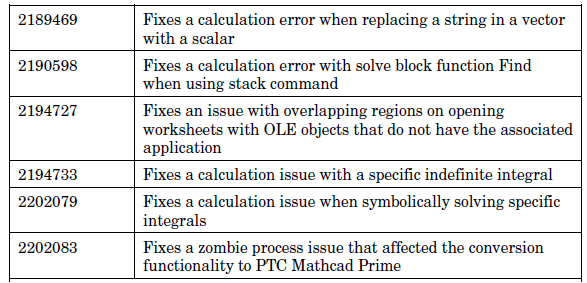
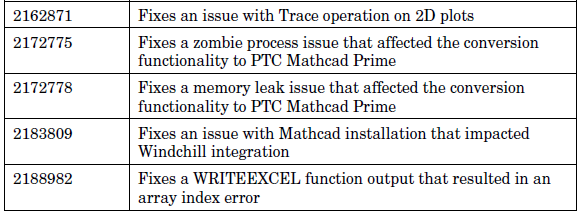
Recently released a new service release of Mathcad 15 M030. List of bugs fixed in Mathcad 15 M030:
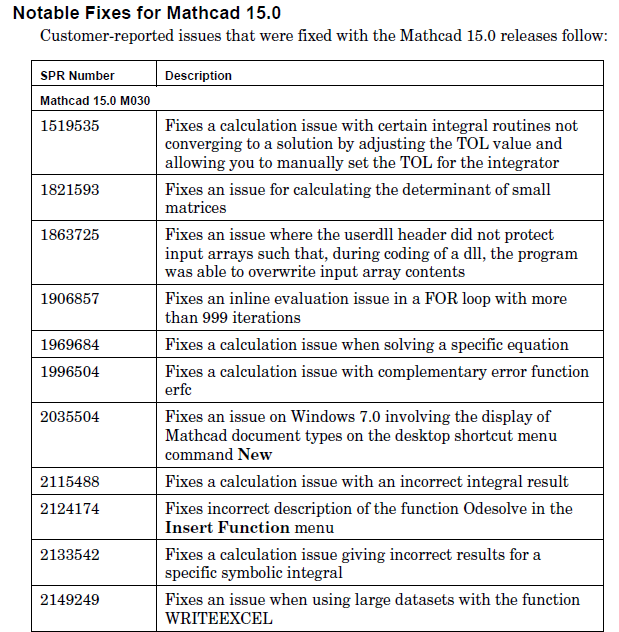
Pic_1.png

Pic_2.png

Pic_3.png

PDF file "Mathcad 15.0 M30 Read This First", which presented a list of bug fixes, can be found in attachment.

Note that the manual "Read this First" and "Installation Guide" can be found in "Help" menu with first run the installation package of Mathcad.
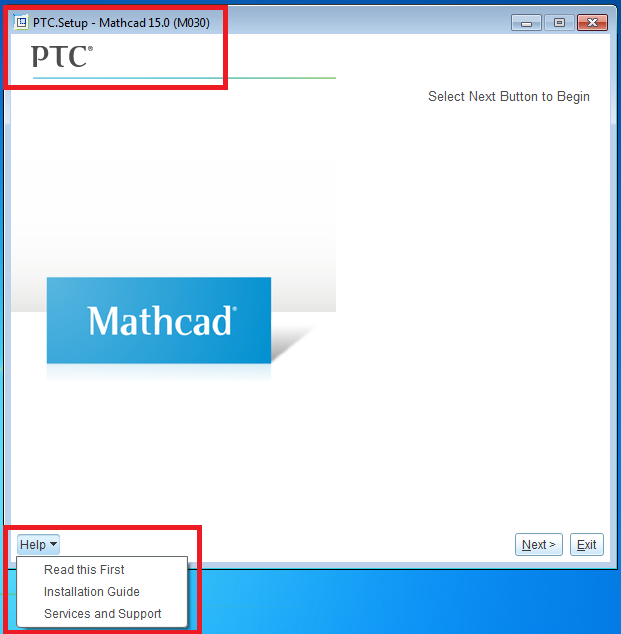
Pic_4.png

1 reply

1-Visitor
December 20, 2013

Just to note the installation guide is the same M020 as previously.

Thanks for the post.

15-Moonstone
December 21, 2013

Hello,

I have an installation of this version M030 problem.

Whatever the directory where I want to install, it is denied.

Even though I chose the directory MathCad 15 M020, or it is installed, the installation is rejected.

The exact message is:

The selected installation directory C: \ Program Files \ Mathcad \ Mathcad 15 exists but does not include PTC product invalid. Specify a nonexistent directory or an existing Mathcad directory.

I tried all the combination, but it will not boot. If you have a solution.

Cordially.

Denis.

25-Diamond I
December 21, 2013

I encounter the same problem. This seems to be a bug in the installer.

But you should be able to install in a different directory (e.g. type "Mathcad15" instead of the default "Mathcad 15"). Your older version is recognized nonetheless, gets uninstalled and your Handbook and template directories are backed up the usual not really userfriendly way. Save your license file before installation.

I also face a small problem concerning the license file but I am not sure if this is new. I recall that when I pointed Mathcad to a license file (e.g. on an USB thumbdrive) this file gets copied in the licenses directory and would be able to disconnect the thumbdrive. This is not the case now, Mathcad insist on the originally givebn path. If Icopy the license file manually to the licenses directory it worked on some machines, on others I had to switch to flex server licensing and then back to license file again to have Mathcad recognize the copied file.