1-Visitor
January 31, 2011
Solved

Odd Solve Loop Bug

  • January 31, 2011
  • 1 reply
  • 2099 views

I am kind of new to MathCAD but I seem to be having a strange bug. I have a simple solve loop that works in one sheet. When I copy it to a new sheet I get the error "This variable is undefined". I can't seem to find any reason why it will work in the current sheet but won't in another one.

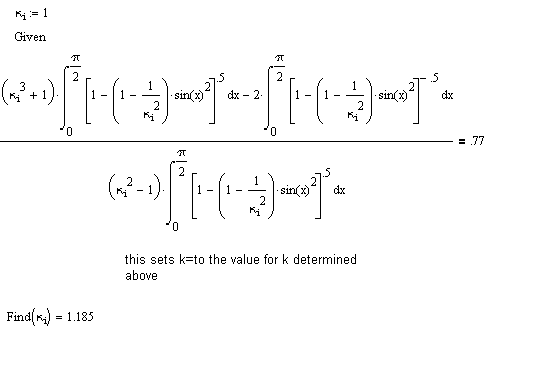
I attached the working copy. Can anyone else copy the entire loop into a new worksheet and have it still work?

Thanks in advanced.

Broken
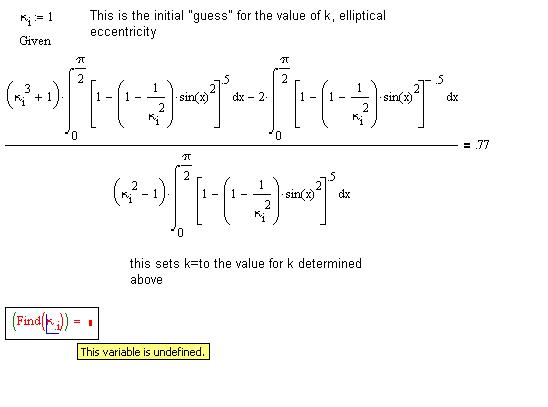
Solve Loop Broken.JPG

Working

inSolve Loop Working.bmp

Best answer by AlanStevens

If you look on the original worksheet under Tools/Worksheet Options.../Calculation you will see that the 0/0=0 box is checked. When you copy to a new sheet, the default is that the 0/0=0 box is unchecked. So, at some point in the calculation a 0/0 occurs.

To avoid the problem you can either check the 0/0=0 box in the copy sheet, or simply replace the initial guess by 2 (which doesn't seem to incur a 0/0 problem).

Alan

1 reply

19-Tanzanite
January 31, 2011

If you look on the original worksheet under Tools/Worksheet Options.../Calculation you will see that the 0/0=0 box is checked. When you copy to a new sheet, the default is that the 0/0=0 box is unchecked. So, at some point in the calculation a 0/0 occurs.

To avoid the problem you can either check the 0/0=0 box in the copy sheet, or simply replace the initial guess by 2 (which doesn't seem to incur a 0/0 problem).

Alan