
1-Visitor
June 18, 2013
Solved

On Error Programming

  • June 18, 2013
  • 3 replies
  • 7189 views

Hey

I'm kinda new to Mathcad, but it works ;D
Now I'm wondering if there is any possibility to use "on error" programming. (see attachement)

I want to return "1" if the match function found at least one zero element in a collumn of the given and "0" if not.
"0" won't work because of the error message by Matchcad.


The example is in German, so here the commands in English:

vergleich(z,A) = match(z,A)

And my own procedure: istNullVorhanden="isAnyZeroElement"

I use Mathcad 15. I also try to find a clue in previous community entries, but I only found the statement that "on error" programming is a way for the match() function.

Thank you for every help ♥
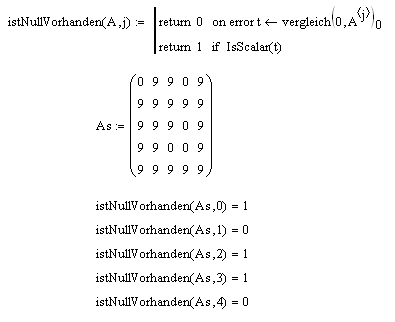
Best answer by ptc-5152170

But it worked for me. I got my "1" and "0" by adding just a little change.
match_example.png

Maybe this isn't the finest way for this, but at the moment it helped out.

3 replies

19-Tanzanite
June 18, 2013

Like so:

match.PNG

Alan

25-Diamond I
June 18, 2013

The problem with this method is, that it will return 0 if no match is found but will also return 0 if a match (a zero) is in the first position (index 0).

ptc-51521701-VisitorAuthorAnswer
1-Visitor
June 19, 2013

But it worked for me. I got my "1" and "0" by adding just a little change.
match_example.png

Maybe this isn't the finest way for this, but at the moment it helped out.

25-Diamond I
June 18, 2013

In the future please attach the Mathcad worksheet, not just a pic.

You are right, you will need the "on error" construct as match will throw an error in case it does not find a match.

One possible way

Nullen.png

Another way would be to do without match and simply compare the product of the vector elements against zero - see attached.

A more natural way would be to write ones own count() routine.

1-Visitor
June 18, 2013

Thank you so much you two! ^.^

AlanStevens' answer help atm but thank you Werner for your annotations! I think I can use them later.

Well, but after I read "on error" and searched for it in Mathcad (programming window) I was little ashamed... I didn't noticed that there was "on error" function already displayed before... Sorry guys!

Actually I'm not a fan of "programming by clicking" everything together, but there is no other opportunity,isn't it? 😕

25-Diamond I
June 18, 2013

Actually I'm not a fan of "programming by clicking" everything together, but there is no other opportunity,isn't it? 😕

You cannot just type in those tokens, only alternative to clicking is the use of the keyboard shortcuts. But be aware that in the localized version they do not all work as stated in the help or tooltip. E.g. "on error" is not Ctrl+' but Ctrl+ä in the German version, or better said with a German keyboord layout.

1-Visitor
June 19, 2013

E.g. "on error" is not Ctrl+' but Ctrl+ä in the German version, or better said with a German keyboord layout.

Yup, I noticed that.

So I rather will just click. But you accustom yourself to it in time I think.