4-Participant
November 9, 2022
Solved

Overflow during using step range function
  • November 9, 2022
  • 1 reply
  • 2133 views

overflow.PNG

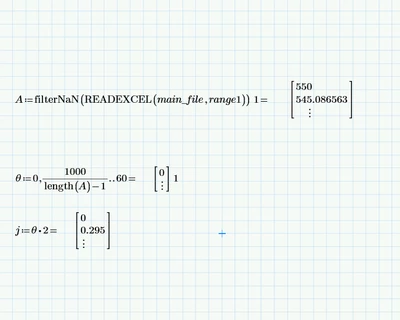
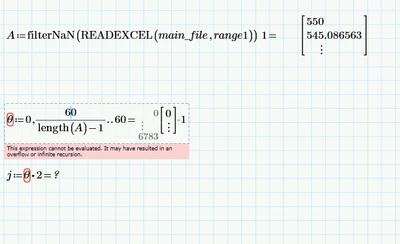
working fine.PNGHi, I have problem with step range function when I put step which gives me array with more than 5000 elements. It gives me an error with overflowing. It is really strange for me because when I insert an array with more than 5000 elements from excel table, it works fine. So, do you know why this is happening, because 5000 elements doesn't sound too big for me. If it's overflowing, do you know other way how I can make an array with size of inserted array from excel, because it is important for me that number of elements of array can vary with using other excel tables.


Thanks in advance and Best Regards!

Best answer by Werner_E

Try to avoid inline evaluations!

Instead of theta:=....= simply use theta:=..... (without the equal at the end) and let the variable theta display in a separate region.

Inline evaluations often work OK and indeed they should do so, but experience shows that ever so often they are responsible for some quite exotic and not understandable errors. So its a good habit to avoid them throughout (like after the definition of your variable A)

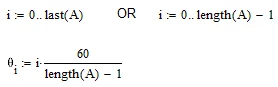
Furthemore its an undocumented feature that using an inline evaluation when defining a range, doing so turns the range into a vector. Its convenient but nonetheless should be used with care and only if you are aware of this feature. But probably you knew about that and need theta to be a vector as the way you defined variable j would only work that way. If thats the case I would suggest creating the vector the "classic", "legal" way.

Werner_E_0-1667993464847.png

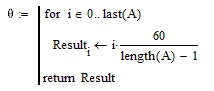
or avoiding a worksheet range i by using a programmed loop

Werner_E_1-1667993548403.png


BTW, is always better to include the worksheet itself as well and not just posting screenshots. If sharing the data is an issue you may create a sheet using dummy data showing the problem as well.

1 reply

Werner_E25-Diamond IAnswer
25-Diamond I
November 9, 2022

Try to avoid inline evaluations!

Instead of theta:=....= simply use theta:=..... (without the equal at the end) and let the variable theta display in a separate region.

Inline evaluations often work OK and indeed they should do so, but experience shows that ever so often they are responsible for some quite exotic and not understandable errors. So its a good habit to avoid them throughout (like after the definition of your variable A)

Furthemore its an undocumented feature that using an inline evaluation when defining a range, doing so turns the range into a vector. Its convenient but nonetheless should be used with care and only if you are aware of this feature. But probably you knew about that and need theta to be a vector as the way you defined variable j would only work that way. If thats the case I would suggest creating the vector the "classic", "legal" way.

Werner_E_0-1667993464847.png

or avoiding a worksheet range i by using a programmed loop

Werner_E_1-1667993548403.png


BTW, is always better to include the worksheet itself as well and not just posting screenshots. If sharing the data is an issue you may create a sheet using dummy data showing the problem as well.

4-Participant
November 9, 2022

But I need that theta for additional calculations, and when I use theta , an error appears "this variable is undefined". I can't share a whole worksheet because of privacy of the project.

25-Diamond I
November 9, 2022

See my edited reply above. Your calculations seem to need theta be a vector and not a range. I added two ways to create this vector without using that undocumented inline eval feature.