4-Participant
November 5, 2024
Solved

PAGE SETUP FOR ENGINEERING CALULCATIONS

  • November 5, 2024
  • 2 replies
  • 1977 views

Hi


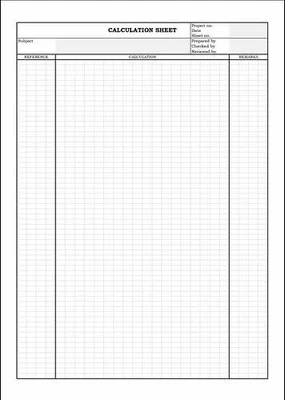
Please assist in setting up a page as the screenshot provided. To seperate the page into three sections for Engineering calculations.

Thaks in advance.
 

JM_12291480_1-1730792732143.png


Best answer by StuartBruff

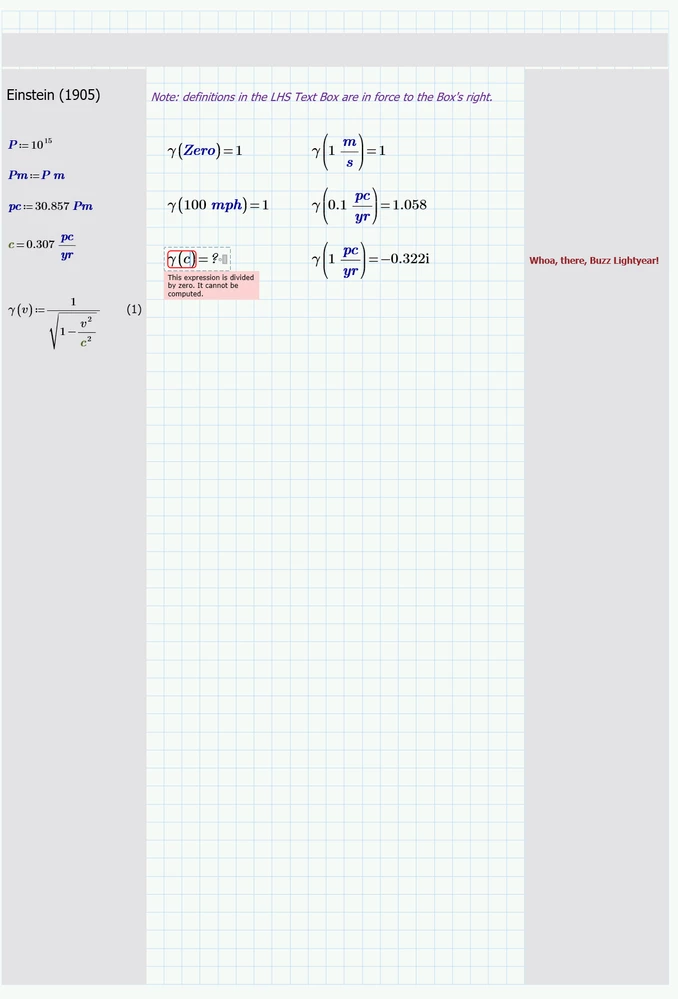
In addition to Werner's suggestions,  You could also have a look at using narrow Text Boxes.  There isn't a border option for Text Regions, which is a pity, so shading is a possibility or vertical lines.   However, the big caveat is that definitions that appear in a Text Box are in force to the right of the box's position marker (near the left hand top corner).  I've occasionally used this technique to give the impression of multicolumn flow.


2024 11 05 A.png


Stuart

2 replies

25-Diamond I
November 5, 2024

Prime only has very modest and limited text processing options. Multiple columns, vertical guides etc. are not included.
You would therefore have to take care yourself to place the calculation expressions only within the middle area, to prevent the results from “overflowing” into the right-hand column (e.g. by selecting a smaller font size for the relevant region) and could at best try to realize the vertical lines by including graphics. Similar applies to the header.

4-Participant
November 5, 2024

Thank you very much for your repsonce. Graphics how? as in a image? I can't seem to find any other way.

25-Diamond I
November 5, 2024

@JM_12291480 wrote:

Thank you very much for your repsonce. Graphics how? as in a image? I can't seem to find any other way.


Yes, I had in mind to insert the image of a vertical line created in any software capable of.
If a vertical line is mandatory, I thought inserting a graphic/image would be an option.

Another option which comes to my mind is a text field with ASCII graphic characters taken from Windows' character map:

Werner_E_1-1730824435195.png


Prime 10 file attached

23-Emerald V
November 5, 2024

In addition to Werner's suggestions,  You could also have a look at using narrow Text Boxes.  There isn't a border option for Text Regions, which is a pity, so shading is a possibility or vertical lines.   However, the big caveat is that definitions that appear in a Text Box are in force to the right of the box's position marker (near the left hand top corner).  I've occasionally used this technique to give the impression of multicolumn flow.


2024 11 05 A.png


Stuart

4-Participant
November 5, 2024

Thank you very much. I think thsi is the only way to seperate them, I will make and save it as template. it would be nice if such modifications could be added on the software, these are the best ways to show engineering calculation while giving reference to standards and comments.

23-Emerald V
November 5, 2024

@JM_12291480 wrote:

Thank you very much. I think thsi is the only way to seperate them, I will make and save it as template. it would be nice if such modifications could be added on the software, these are the best ways to show engineering calculation while giving reference to standards and comments.


You could raise a feature request with Support or on the Mathcad Ideas forum.


https://community.ptc.com/t5/Mathcad-Ideas/idb-p/PTCMathcadIdeas


I've suggested similar ideas over the years, including multi-column Text Boxes that flow up and to the right.


User-definable tab stops are another long-standing Prime request that would enhance Text Boxes, as well as being able to embed plots within them.


Stuart