
1-Visitor
March 21, 2013
Solved

POLYNOMIAL Approximation to a Function

  • March 21, 2013
  • 2 replies
  • 5671 views

Hello everyone,

Please look at the attached MathCad worksheet.

I would like to generate a suitable (cubic) polynomial to Ki"zero"(alpha) function and compare it with the actual one.

I guess, MathCad can do this automatically.

Thank you so much for the time and help.

Regards,

Anousheh
Best answer by RogerYeh

There were some errors in appending the images. I only see one (the first one).

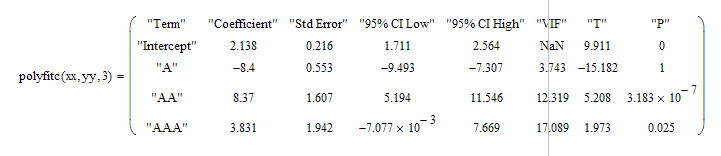
In regards to the coefficients, use POLYFITC:

Untitled.png

2 replies

1-Visitor
March 21, 2013

Hmmmm, well, you can use the POLYFIT function:

01.png

If you change the x-values over which you're fitting, you get different looking curves:

02.png

Anousheh1-VisitorAuthor
1-Visitor
March 21, 2013

Hello Roger,

Thank you so much.

This is the range I am interested in:

As it can be seen, it is not a good fit in this range.

Polynomial.jpg

This is what I need from MathCad: I have generated this manually in EXCEL.

Polynomial Function.jpg

One other thing: I need to have the actual POLYNOMIAL function (like one highlighted above) for publication purposes.

Regards,

Anousheh

RogerYeh1-VisitorAnswer
1-Visitor
March 21, 2013

There were some errors in appending the images. I only see one (the first one).

In regards to the coefficients, use POLYFITC:

Untitled.png

25-Diamond I
March 21, 2013

You may try simple regress an go for the coefficients

regress.png

Anousheh1-VisitorAuthor
1-Visitor
March 21, 2013

Hello Werner,

Yet, another beautiful worksheet. Very nice and helpful. I shall use this as a REFERENCE for future use.

One question: how do we expand this for multi-variable functions?

Thank you and regards,

Anousheh

25-Diamond I
March 21, 2013

One question: how do we expand this for multi-variable functions?

Thank you and regards,

Anousheh

Getting the coefficients is a bit more work for multi variable functions and uttilizes one or two small programs. Fortunately thats covered very well in the help. Look for regress and follow the link on the bottom to the appropriate quicksheet. My wisdom stems from there 😉