
25-Diamond I
January 12, 2013
Question

Prime2 exception error while tabbing through vector

  • January 12, 2013
  • 4 replies
  • 7979 views

I came across that error while working on a worksheet in another thread here.

I do not have that much experience an I coul not find a way to look at the elements of a vector or matrix which are not displayed (that is more than the first eleven). I am missing the scrollbar and a way to resize that region.

When I try to go from one value to the next with the Tabulator key, whenever I try to go beyond the eleventh value I get an exception error.

Is it a Prime error or is my installation faulty?

Windows XP SP3, 1GB RAM 😞
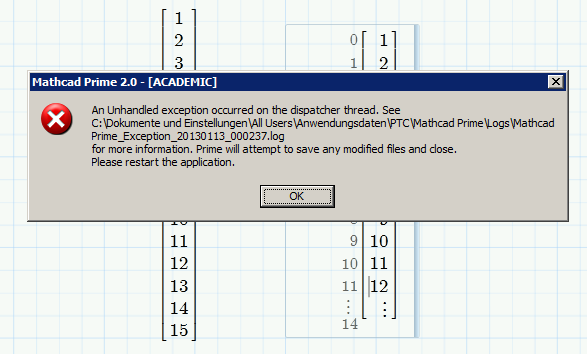
vektor_error.png

Excerpt of the log file:

Exception data:

System.Object:

System.ArgumentException: There must be exactly rows x cols (15) but there were 12

at Ptc.Matrices.MatrixHelper.AddRow[T](Int32 rowToAdd, Int32 rows, Int32 cols, T[] elements, DelegateFunction0`1 createDefaultElement)

at Ptc.EquationEditor.Equation.EquationModel.ae.a(Direction A_0, Boolean A_1)

4 replies

24-Ruby IV
January 13, 2013

I have checked it with Win 7 and 8 - no problem.

Werner_E25-Diamond IAuthor
25-Diamond I
January 13, 2013

Tnx.

How it is expected in Prime to browse through a vector or matrix? Even if Tab don't crash it would be tedious to do so with a very large vector.

As it works for you it seems to be either a problem with XP or with to less memory (but then - with that small worksheet??

On the other hand I am a little bit confused about the error message in the log "There must be exactly rows x cols (15) but there were 12" . The size of the vector IS 15 elements, why is Mathcad only aware of 12?

24-Ruby III
January 13, 2013

Werner,

Have you installed .NET Framework 4.0 and some Hotfix's from Microsoft?

http://communities.ptc.com/servlet/JiveServlet/showImage/2-190370-38686/Pic_5.png

http://support.microsoft.com/kb/2652531

http://support.microsoft.com/kb/2588096

Werner_E25-Diamond IAuthor
25-Diamond I
January 13, 2013

Have you installed .NET Framework 4.0 and some Hotfix's from Microsoft?

http://support.microsoft.com/kb/2652531

http://support.microsoft.com/kb/2588096

Vladimir, thanks for your reply.

.NET4 ist installed, otherwise Prime would not work at all, I think.

I have seen those two hotfixes mentioned in the past and decided to not install, as it didn't look like I have the problems described and M$ advises to install them not by default but only if needed(?) . Maybe I give them a try after the next complete system backup.

24-Ruby III
January 19, 2013

Hi Werner,

I will test your file as soon as I can have access to Mathcad Prime 2.0 and then log this issue for tech support.

Werner_E25-Diamond IAuthor
25-Diamond I
January 14, 2013

OK, I just tried it on two more computers. One of them XP, 32bit, the other Windows 7 and Prime2 64 bit.

On both machines I experience the same error!!

When I click in the second region (the evaluation of v, not the assignment) on any number in the vector and press the tabualtor key after element nr. 11 (12), Mathcad crashes and I get that exception error.

Three different macchines, Win XP and Win7, 32bit and 64 bit - so I suppose it to be a Prime2 error/bug.

BTW, I am using Prime2, release M010.

Valery had reported that it worked for him in Win7 and Win 8!?

Can anybode else report if it worked or failed for him?

12-Amethyst
January 14, 2013

Re-created the file & tried on Windows 7.

Tabbing down 1st column - reach the end & adds new elements at the bottom (OK assignment)

Tabbing down the 2nd column - reach the end & add new elements but greys the column (Wrong? - should be the display of a vector )

note that deselecting this column allows self-correction.

Tabbing down 3rd column - reach the last displayed element then one more tab will cause the crash

(note that it can take some time - so it is possible to think that later action could also have caused the crash).

Regards

Andy

Werner_E25-Diamond IAuthor
25-Diamond I
January 14, 2013

A Westerman schrieb:

Tabbing down 3rd column - reach the last displayed element then one more tab will cause the crash

So its a bug - thanks for verifying!

Thats exactly the behaviour I I experienced.

The crash only occurs when the region is sized so that not all elements of the vector are seen.

Someone from PTC should log that bug.

Another question: I finally found the way to resize the region, but what if the vector has, lets say, 2000 elements and I would like to look at the last ones? Resizing for the whole vector to be visible would be not practical and it seems to me that the necessary scrollbars are missing.

1-Visitor
January 14, 2013

I had the same problem, but I'check of this and work fine.

I'm using Win 7(No Aero) and Prime 2.0v M010.

see file:

Werner_E25-Diamond IAuthor
25-Diamond I
January 14, 2013

Jan, what do these two services of .NET 3.5.1 are for and in what way could they affect a .NET4 application?

I just activated both , but Prime2 stills crashes in the aforementioned situation.

It really seems to be a bug in Prime. If a vector region is sized so that only part of the vector is seen, mathcad complains (according to the log) that the vector has less elements than it should - one part of mathcad is aware of the elements not visible on screen, one other part of it is (wrongly) not aware of the invisible elements.

Obviously we are not supposed to tab through the evaluation of a vector, that approach is meant for vector assignments (and BTW is a nice feature). Nevertheless the program crash should not happen.

1-Visitor
January 14, 2013

Download the latest dates of NET Framework 4(All setup file).


Will not work as it can help to re-install the Windows.


I do not know what else to write