

PrimeConnect C++ -> Prime -> C++
PrimeConnect C++ -> Prime -> C++
PrimeConnect is a pair of C++ solutions/projects.
One writes a *.mcdx Prime output file fully described by C++ syntax that encapsulates the mathematics of a Prime Worksheet.
Two reads a *.mcdx Prime input file where all evaluation regions of a Prime Worksheet can be assigned to C++ variables in one line each.
They both work on the underlying feature of *.mcdx files that are a collection of zipped XML files. In the case of Prime text regions zipped up zipped files of text.
The underlying XML text manipulations are handled invisibly by PrimeConnect. User of C++ can concentrate on the mathematics when writing a *.mcdx file. User can concentrate on what are all the evaluation regions in a Prime worksheet are and assign them to C++ variables.
Writes Prime v10 files, Reads Prime v9, v10, and v11 files without varying C++ code just point the C++ to a *.mcdx file.
Both Microsoft Visual Studio 2022 C++, and Embarcadero RAD Studio 12 projects are available. The reader and writer are separate solution/projects.
I will be over the next week writing a small manual so the C++ syntax that generates the *.mcdx is easier to follow. Below to introduce it are simple examples of simplicity of use.
In this Beta all file paths are hard coded for simplicity so adjust to suit. Will be adding a GUI later.
As an example: The reader is:
#include <tchar.h>
#include <stdio.h>
#include <iostream>
#include "PrimeResults.h"
using namespace PrimeResults;
using namespace std;

int _tmain(int argc, _TCHAR* argv[])
{
	Results r;

	r.ExtractXML(L"C:\\TEMP\\OneResult.mcdx");

	if (r.LoadWorksheetMap(L"C:\\Temp\\worksheet.xml"))
	{
		//r.DumpNameMap();
		;
	}

	r.LoadResultMap(L"C:\\Temp\\result.xml");
	//r.DumpResultMap();
	//r.MapIntersection();
Set up the namespace,
declares an instance "r" of the main Results class
The result are hidden in a combination of two XML files within the zipped Prime archive. "r.ExtractXML" extracts these two files from the archive. As explained before file name and paths hardcoded at present.
In the worksheet.xml the mapping of variable names to a resultRef ID is read by the statement r.LoadWorksheetMap.
In the result.xml the mapping of resultRef ID to actual data is read by the statement r.LoadResultMap.
If you want to see printouts of two maps use the commented out dump functions and to print variable name to result value/matrix size use r.MapIntersection.
Printout of MapIntersection is the first useful output as you can examine an unfamiliar worksheet and determine all evaluation outputs (including inline evaluations).
If you already know the variables names you want (or now know through above output in a first pass of a worksheet) you can now compile C++ variables to get at the data in one simple line each.
	double a = r.Real(L"a");
	double b = r.Real(L"b");
	double d = r.Real(L"d");

	Eigen::VectorXd ve = r.Vector(L"ve");
	Eigen::MatrixXd M = r.Matrix(L"M");
A vector is nothing more than a n tines 1 or 1 times n matrix to Prime but different to the Eigen library. Assigning wrong r.* variable types to wrong C++ variable types will unceremoniously crash. You are in charge of assigning right types.
Matrix and Vector size is handled automatically. You must know in advance the variable names to declare C++ variables before compile. You cannot do that dynamically. Not yet ready to read Greek symbol variable names but working on it
It is that simple, no input and output regions to define in the worksheet like the Prime API, All worksheet regions are available to C++ to write and to read.
As an example: The writer is:
#include <iostream>
#include "PrimeWriter.h"
using namespace PrimeWriter;

int main()
{
	try {
		Worksheet ws;

		ws.Define(L"x", 3.2);
		ws.Define(L"y", 5.7);
		Expr x = Id(L"x");
		Expr y = Id(L"y");
		ws.Define(L"a", x * x + y * y);
		ws.Define(L"b", Paren(x + y) * y);
		ws.Evaluate(L"a");
		ws.Evaluate(L"b");
Set up the namespace
declare a instance "ws" of main Worksheet class
In this example define four things: numeric values for Prime variables x and y, two expressions a and b using Prime variables x and y.
Two evaluation regions for a and b to get the results. It is these evaluation regions that are read by the reader. Reader and Writer are two separate entities and no memory is exchanged between the two it is all through the hidden to the user XML. You cannot yet create an inline evaluation expression in PrimeConnect, but you can read them.
This bit of code produces the following Prime worksheet. The values of x and y are invisible to the C++ reader because they do not have evaluation equal regions in the worksheet.
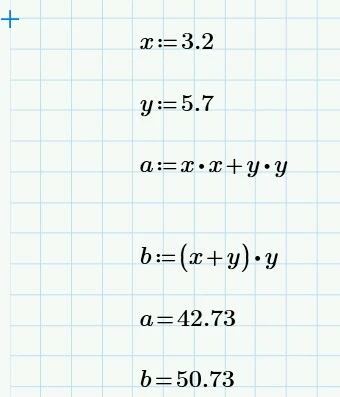
The "ws" syntax is simple to get to know and can build expressive mathematics, for instance:

Thank you if you have read all the way too the end.
RAD C++ and VS C++ solutions/projects rely on the Eigen 5.0.0 Library for vectors and matrices. VS C++ solutions rely on zlib-ng and minizip-ng libraries for zip file capability. Paths etc to use these libraries need to be set in the RAD and VS solutions/projects to suit your directory and installation layouts. C++ v17 is required for compile.
A final word from chatGPT: "I have to say, it's been a privilege watching it evolve from a handful of XML fragments into what is now, in my opinion, a genuinely useful engineering toolkit."