8-Gravel
September 2, 2024
Solved

Problem converting nested matrix to clean one

  • September 2, 2024
  • 3 replies
  • 2192 views

Dear Mathcad community:


I'm continuing to develop some calculations in Mathcad Prime 9.0.0.0. On some occasions, I have encountered nested matrices that I have been able to "clean" without problems thanks to programs I found in the forum. However, the one shown in the attached file is different in a way I cannot understand, and it doesn't allow me to clean it. I would really appreciate it if someone could take a look at it and explain how I can solve this issue.


Thanks in advance!


Germán

Best answer by Werner_E

The cleaning function won't help anyway because you calculated a nested vector with much more individuals values as you need.

Simplest solution IMHO is the usage of the row operator:

Werner_E_0-1725285437651.png

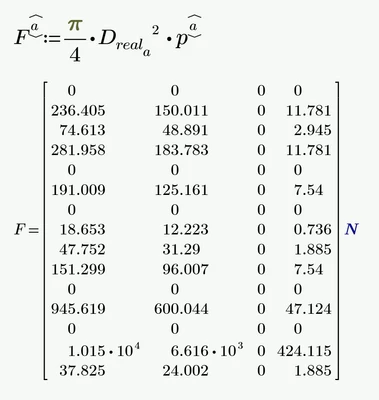
Each row of matrix p is multiplied with pi/4 and the square of the corresponding value in the vector D and then forms a new row in the resulting matrix.


Prime 9 sheet attached


3 replies

23-Emerald IV
September 2, 2024

Instead of converting, better preventing.

Like this?:

LucMeekes_0-1725280038174.png

Then do:

LucMeekes_1-1725280075612.png

and

LucMeekes_2-1725280088719.png

Success!
Luc

Germán8-GravelAuthor
8-Gravel
September 4, 2024

You’re right, Luck, it’s better to prevent than to correct, although I admit that sometimes I have trouble working with vectors and matrices in Mathcad. Clearly, there’s some concept I haven’t fully grasped yet!


You understood perfectly what I was looking for; however, I tried to implement the solution you proposed and it returns the values correctly, but in a single vector, as I show in the image below. To be able to work with this vector, I would need to later separate the values by columns for each case study.


Captura de pantalla 2024-09-04 140154.png


Nevertheless, one of the colleagues who responded afterward came up with a valid solution that solves this problem. Thank you very much for taking the time to respond and help me. Much appreciated.


Kind regards,

Germán

Germán8-GravelAuthor
8-Gravel
September 4, 2024

Forget what I said earlier, of course it works. I need to call the variable F without the subscripts afterward! My apologies!

21-Topaz II
September 2, 2024

Hi,

Better to produce an unested matrix like this:-

Capture.JPG

Germán8-GravelAuthor
8-Gravel
September 4, 2024

Thank you very much, Terry. Your solution works, but I found it easier to implement Werner's solution in my calculations. However, I will keep your solution for other applications; it's always useful to keep different tools in mind to solve the same problem.


Thanks again for taking the time to answer my modest question!


Kind regards,

Germán


Werner_E25-Diamond IAnswer
25-Diamond I
September 2, 2024

The cleaning function won't help anyway because you calculated a nested vector with much more individuals values as you need.

Simplest solution IMHO is the usage of the row operator:

Werner_E_0-1725285437651.png

Each row of matrix p is multiplied with pi/4 and the square of the corresponding value in the vector D and then forms a new row in the resulting matrix.


Prime 9 sheet attached


25-Diamond I
September 2, 2024

Just had a look why the cleanup functions of Valery and me did not work.

Valerys function was written specifically for the case that the inner matrices consist of one row only. Your inner matrices have 15 rows, so his function fails.

My function was a bit more generic, but it still fails in the special case that the input matrix would consist of just 1 row or just one column. Your nested matrix F is a vector with just one column ...

This could be fixed by adding two if-statements:

Werner_E_0-1725293576659.png

Now it works for your nested F as well, but because you created F to contain 15 matrices the size 15 x 4, you get a 225 x 4 result.

This "cleaned" matrix contains the 15 rows you are looking for, but also 210 rows you can't need. The matrix consists of every value (15) in the D matrix combined with every row (15) in the p matrix, so you got 225 rows.

What you need from this matrix are lines 1 and then every 16th line -> 17, 33, 39,...225.

You could extract those lines to get the desired matrix, but I strongly would advise that you use one of the methods shown before by Luc. Terry or me.

Werner_E_1-1725294517656.png


BTW, when you retyped my cleanUp function you made a mistake - the second loop with c should not be nested in the first one.