15-Moonstone
October 30, 2022
Solved

PWM Controller Issue

  • October 30, 2022
  • 1 reply
  • 2402 views

Hi,


People here on the forum helped me define a PWM controller, in the past. I made a tweak to that formula, so that it starts at zero. However, I've noticed there is a weird issue with Mathcad. If you look at two cycles, it will be off when it should still be on. This happens on the second cycle. It turns off one time step too soon. However, it's random and depends on the duty cycle entered. I'm wondering if there is another way to define this, so that this issue can be avoided.


I've messed around with it as much as I can but have reached a dead end.


Thanks,


Anthony

Best answer by Werner_E

Ah, I see now. And now I am wondering why you posted a sheet with a value of d where the issue is NOT showing up!??

I set the duty cycle d to 35% and I get this:

Werner_E_1-1667121702874.png

The function returns 0 while its supposed to return 1.

Reason is that you experience simple rounding errors. These are common when dealing numerically in a computer program and cannot be avoided. An often seen example is shown below, showing that even just the order a calculation is done can make a difference:
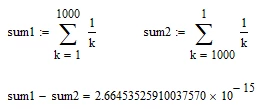
Werner_E_9-1667123252451.png


When we let Mathcad show the max of 17 decimals we see whats going on.

The values of tc and tc(1+d) seem to be exact 1 s and 1.35 s,
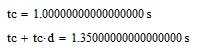
Werner_E_2-1667122433675.png

but decimal numbers like these most of the times cannot be stored exactly in binary representation and when you use them for any calculations the round-off errors may show up in the results as can be seen here:

Werner_E_3-1667122459175.png

Even simple and obvious calculations can yield unexpected rounding errors:

Werner_E_4-1667122569080.png

Thats the reason why in programming its a rule not to ask if a value is exactly zero but rather if its approximately zero (if |value|<10^-12 or the like).

If that effect is a severe issue in your application, you might add a small number like this:

Werner_E_5-1667122688976.png

Another option can be to round every numbers involved down to a certain precision.

I found that all it needs it to round tc down to nanoseconds (use the "Round" function with an upper case "R" to do so)
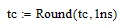
Werner_E_6-1667122830521.png

This at least solves the problem for d=35% and the second cycle. No guarantee that it will also work for the fifth cycle or for other values of d.  It may be necessary to round down ALL involved numbers. E.g. I found that when I still use d=35% but use picoseconds instead of nanoseconds he problem persists. So it might be a better idea to round down all numbers used in the function and no the number stored on worksheet level.

Werner_E_8-1667122999550.png

(it should not be necessary to define tc rounded down as shown before)

I guess picoseconds may be to small as some round-off errors might be larger. You have to find a value which is a good compromise between accuracy of results and elimination of round-off and conversion errors.


There sure are other ways to define a pulse (using the Heaviside function or using the if-function instead of the boolean expression) and to make it periodic you could replace the mod(a,b) function by a-b*trunc(a/b), but rounding errors can happen no matter what kind of calculation expression you are using.



1 reply

25-Diamond I
October 30, 2022

I wonder what you think is wrong in the file you posted. Your function returns 1 for every positive multiple of 0.5 s and thats the way you defined your function. I am not sure what you mean by the "function turning off one time step too soon in the second cycle".

Here is your "check" as I see it when i open your file. Do you experience different results?

Werner_E_0-1667120455895.png


BTW, Mathcads definition of Hz is not wrong, its just not the one you are used to. Thats the reason Mathcad also provides a unit Hza.

Werner_E25-Diamond IAnswer
25-Diamond I
October 30, 2022

Ah, I see now. And now I am wondering why you posted a sheet with a value of d where the issue is NOT showing up!??

I set the duty cycle d to 35% and I get this:

Werner_E_1-1667121702874.png

The function returns 0 while its supposed to return 1.

Reason is that you experience simple rounding errors. These are common when dealing numerically in a computer program and cannot be avoided. An often seen example is shown below, showing that even just the order a calculation is done can make a difference:

Werner_E_9-1667123252451.png


When we let Mathcad show the max of 17 decimals we see whats going on.

The values of tc and tc(1+d) seem to be exact 1 s and 1.35 s,

Werner_E_2-1667122433675.png

but decimal numbers like these most of the times cannot be stored exactly in binary representation and when you use them for any calculations the round-off errors may show up in the results as can be seen here:

Werner_E_3-1667122459175.png

Even simple and obvious calculations can yield unexpected rounding errors:

Werner_E_4-1667122569080.png

Thats the reason why in programming its a rule not to ask if a value is exactly zero but rather if its approximately zero (if |value|<10^-12 or the like).

If that effect is a severe issue in your application, you might add a small number like this:

Werner_E_5-1667122688976.png

Another option can be to round every numbers involved down to a certain precision.

I found that all it needs it to round tc down to nanoseconds (use the "Round" function with an upper case "R" to do so)

Werner_E_6-1667122830521.png

This at least solves the problem for d=35% and the second cycle. No guarantee that it will also work for the fifth cycle or for other values of d.  It may be necessary to round down ALL involved numbers. E.g. I found that when I still use d=35% but use picoseconds instead of nanoseconds he problem persists. So it might be a better idea to round down all numbers used in the function and no the number stored on worksheet level.

Werner_E_8-1667122999550.png

(it should not be necessary to define tc rounded down as shown before)

I guess picoseconds may be to small as some round-off errors might be larger. You have to find a value which is a good compromise between accuracy of results and elimination of round-off and conversion errors.


There sure are other ways to define a pulse (using the Heaviside function or using the if-function instead of the boolean expression) and to make it periodic you could replace the mod(a,b) function by a-b*trunc(a/b), but rounding errors can happen no matter what kind of calculation expression you are using.



15-Moonstone
October 30, 2022

thanks werner,


i used your method of adding a tolerance to tc. it seems to work as expected now. sorry to have confused you with the original post. you had to run various duty cycles to see the problem. so i didn't think it would matter how i saved it.


anthony