
15-Moonstone
April 21, 2025
Solved

Python Version Required

  • April 21, 2025
  • 1 reply
  • 1466 views

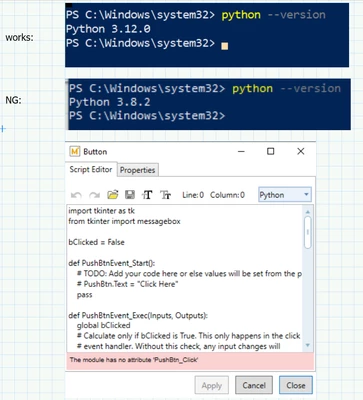
I wanted to play with the advanced control Button Example with python script. I have different versions of python on 2 computers:
rgunwaldsen_0-1745250165075.png

My next step would be to download a newer verson of python onto the computer that fails and see if the problem with the control is resolved.


But: how do I know which version Prime needs/uses? There doesn.t seem to be any documentation in Prime 11 other than a statement along the lines of "Prime will register python and enable python scripts".

 

Best answer by DJNewman


@rgunwaldsen wrote:


But: how do I know which version Prime needs/uses? There doesn.t seem to be any documentation in Prime 11 other than a statement along the lines of "Prime will register python and enable python scripts".


https://support.ptc.com/help/mathcad/r11.0/en/index.html#page/PTC_Mathcad_Help/advanced_controls.html

"PTC Mathcad Prime scriptable controls support VBScript, JScript ES3, and Python 3.7 to 3.13. All controls have scripts written in JScript as a default."

1 reply

DJNewman
DJNewman18-OpalAnswer
18-Opal
April 21, 2025


@rgunwaldsen wrote:


But: how do I know which version Prime needs/uses? There doesn.t seem to be any documentation in Prime 11 other than a statement along the lines of "Prime will register python and enable python scripts".


https://support.ptc.com/help/mathcad/r11.0/en/index.html#page/PTC_Mathcad_Help/advanced_controls.html

"PTC Mathcad Prime scriptable controls support VBScript, JScript ES3, and Python 3.7 to 3.13. All controls have scripts written in JScript as a default."

PTC Marketer for Creo and Mathcad. I run their YouTube channels, some Creo campaigns, and all Mathcad campaigns and communications.
15-Moonstone
April 21, 2025

Thank you for the reference; this is good information, although I would prefer it be in a "system requirements" section. I will download python 3.12 and, hopefully, the problem will  disappear and I will move on.


On a side note: it is a bit unsettling that provided example  code should fail. Does PTC perform regression testing of its examples (here, python 3.7 through 3.13)? Would it be helpful to anybody for me to open a software trouble case? Or would I be simply "beating a dead horse".

DJNewman
18-Opal
April 22, 2025

Personally I only have Python 3.13 installed (no errors, everything is perfect with the Button example). I don't have insight into PTC's testing practices, specifically if the content if the Help Centre has different testing practices (or how extensive they are) than the product itself.


But you should send an email to the documentation team (click the "Send feedback about this page to PTC" button at the top right corner that looks like an envelope found on pretty much every page of Mathcad Help Centre) and explain that the example apparently didn't work on what should be a supported version of Python and see what kind of response you get. I know they're responsive whenever I point out something. (...Maybe because I work at PTC or maybe they're always like that.) It's definitely outside the realm of my expertise on why it'd fail, though.

PTC Marketer for Creo and Mathcad. I run their YouTube channels, some Creo campaigns, and all Mathcad campaigns and communications.