9-Granite
June 6, 2023
Solved

Range variable units

  • June 6, 2023
  • 2 replies
  • 1356 views

Prime is not allowing to change the units with the range variable getting error message

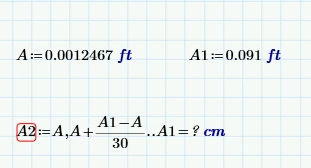
For example in the evaluation I am getting unit as m but i want to change to in or cm it does not allow

TR_9781963_0-1686080585913.png


Best answer by Werner_E

First let me say that I think it would be a good idea to close your four unfinished/unclosed threads.


Concerning your new question - see my answer in the other thread you opened!

https://community.ptc.com/t5/Mathcad/This-value-must-be-a-scalar/m-p/877486/highlight/true#M206809
Werner_E_0-1686092885893.png


@TR_9781963 wrote:

Prime is not allowing to change the units with the range variable getting error message


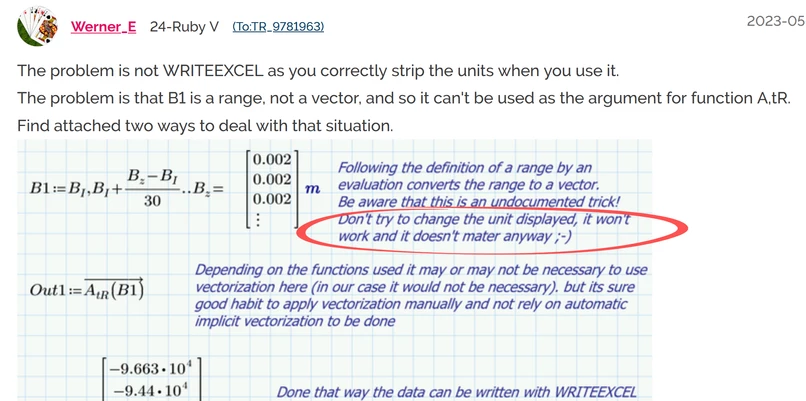
No, its not a range variable. You are using the undocumented trick I showed you in the other thread and already converted the range into a vector. As you see in the comment in the file I posted, Prime won't allow you to change the displayed unit in the region you use this undocumented trick - it is always displayed in the default unit used by the unit system you have chosen.

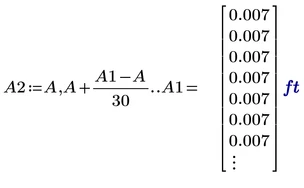
If you set the unit system to USCS instead of SI, you of course will see feet
Werner_E_1-1686093229724.png

If the unit system should be SI, you have to accept the the undocumented range to vector trick won't allow you to change the displayed unit.

You can always minimize the displayed vector and display the assigned variable in a separate region as Terry has shown.


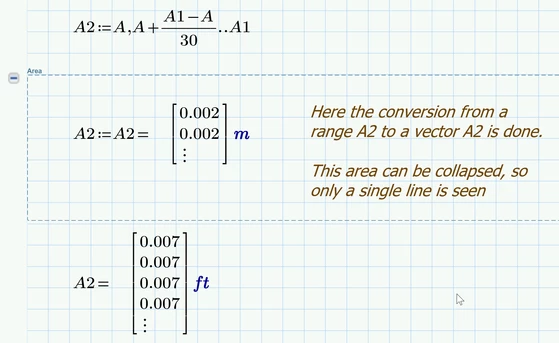
If its for clean documentation, you can make use of a collapsed area in which the range-vector conversion is done after you defined the range:
Werner_E_2-1686093697505.png


And of course you must not make use of this trick but can use a more "legal" way to create the vector (as shown in the other thread.

 

2 replies

18-Opal
June 6, 2023

Like this ??

ppal_0-1686086278912.png


Werner_E25-Diamond IAnswer
25-Diamond I
June 6, 2023

First let me say that I think it would be a good idea to close your four unfinished/unclosed threads.


Concerning your new question - see my answer in the other thread you opened!

https://community.ptc.com/t5/Mathcad/This-value-must-be-a-scalar/m-p/877486/highlight/true#M206809

Werner_E_0-1686092885893.png


@TR_9781963 wrote:

Prime is not allowing to change the units with the range variable getting error message


No, its not a range variable. You are using the undocumented trick I showed you in the other thread and already converted the range into a vector. As you see in the comment in the file I posted, Prime won't allow you to change the displayed unit in the region you use this undocumented trick - it is always displayed in the default unit used by the unit system you have chosen.

If you set the unit system to USCS instead of SI, you of course will see feet

Werner_E_1-1686093229724.png

If the unit system should be SI, you have to accept the the undocumented range to vector trick won't allow you to change the displayed unit.

You can always minimize the displayed vector and display the assigned variable in a separate region as Terry has shown.


If its for clean documentation, you can make use of a collapsed area in which the range-vector conversion is done after you defined the range:

Werner_E_2-1686093697505.png


And of course you must not make use of this trick but can use a more "legal" way to create the vector (as shown in the other thread.

