
12-Amethyst
August 8, 2024
Solved

Re: Mathcad Prime 9 Symbolic Engine Spinning Wheel

  • August 8, 2024
  • 6 replies
  • 7787 views

I am suffering a similar (though much more repeatable issue).

When we as a company upgraded to Prime I was the only one that could not use the symbolic engine & when I raised the issue it was fixed within 2 weeks.


Since then I have had a laptop upgrade & it has reappeared.
a repeat of the IT ticket has not resolved the issue.


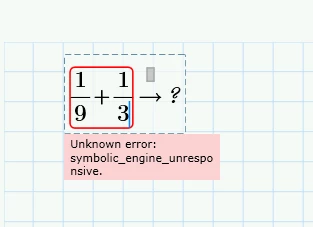
Even the simplest task causes the symbolic engine to crash:
AndyWesterman_0-1723116074374.png


is the final response after many minutes of the sunflower twirling.


Sheet is attached, but probably not helpful as I can give it to colleagues who don't get the same problem. For them it quickly returns the expected 4/9result.


I keep harassing Martin the local IT guy, but all he can do is refer it up the chain & hits a wall.


Any suggestions of things to try would be appreciated.


Thanks

Andy  (too)

    Best answer by AG_10921010

    Hi


    I finally got our company's necessary customer information to file a support case with PTC as suggested further below. They replied very quickly. I am working in an international company in Germany where  the Windows installations seem to vary between German and English (Excel commas and decimal places is a nightmare). In my case MathCad Prime was installed under Program Files / PTC. I also have PTC Creo View Express installed. PTC support told me  to install MC Prime under Programme. I did not have Programme only  Program Files and Program Files (x86). So  I created a Programme folder and it installed there under Mathcad Prime 9.0.0.0. This seemed to solve the problem for the moment anyway. Another colleague who had it also installed under Program Files, but without issues so far, suggested making a symbolic  link rather than reinstall, by executing the following command as an Administrator:

    mklink /D C:\Programme "C:\Program Files"


    I cannot vouch if that works. I followed the PTC advice and deinstalled and reinstalled under a new Programme folder and the Symbolic Engine started up. 


    Andy G

    6 replies

    12-Amethyst
    August 8, 2024

    Screenshot_1.jpg

    I have so.


    25-Diamond I
    August 8, 2024

    As you already suspected the sheet you posted works OK on my side and probably for most of us.

    So the problem which you experience seems to be specific to your installation

    Can't PTC support be of any help here? From what I have seen here in the forum you seem not to be the only one experiencing this problem.

    18-Opal
    August 8, 2024

    Was slow on mine too -. Turned on multithreading and now is fast. Perhaps unrelated and coincidental.


    25-Diamond I
    August 9, 2024

    Symbolic evaluation usually is very slow for the first evaluation done, because this is what forces to finally load the symbolic engine. Subsequent symbolic evaluations should be much faster and on my side I can't see any difference in speed whether Multithreading is turned on or off.

    12-Amethyst
    August 9, 2024

    This is probably the start point, if prime needs to load the symbolic engine, there must be a flag set that permits the action.

    If this is blocked due to a firewall setting, perhaps it sits & waits 


    Unhappily, this is in the hands of IT personnel many time-zones & several thousand miles away.

    Ho Hum.


    24-Ruby III
    August 9, 2024

    Hi,

    I do not understand why below shown expressions are displayed in grey color.

    MartinHanak_0-1723186565235.png


    12-Amethyst
    August 9, 2024

    Посмотрите, как получается, ваша запись и моя на одном листе, мистика?

    Screenshot_1.jpg

    12-Amethyst
    August 9, 2024

    That is so strange!


    when I try to re-calculate the sheet (disable the original set  of equations), I still have the twirling sunflower.

    It will run for more than 5 minutes in this state.


    Unfortunately, all external communication is vis the corporate IT department, we don't have the contract numbers to verify the right to ask for help.


    This e-mail was added to an old chain to see if other users were experiencing the same issues & log it as a problem (if PTC monitor the forum).


    I assume that the 2nd & 3rd lines are grey because the calculation was stopped & these were left 'pending'.


    regards

    Andy

    10-Marble
    August 15, 2024

    Meanwhile, this happens to me as well - always. Sometimes before restarting the computer could have helped, but now even the simplest page with a single simple symbolic calculation will cause the spinning  wheel. Restarting and trying again will cause the "symbolic engine unresponsive" text to appear. I deinstalled Mathcad Prime 9 and reinstalled - did not help. There is something in my Windows installation now it really does not like. Company IT does not want to upgrade to 10 - not sure if that would help in my case anyway.


    Another Andy

    24-Ruby III
    August 15, 2024

    Hi,

    open case at PTC Support and ask them to resolve the problem.

    10-Marble
    August 15, 2024

    Yes I will try Thanks. First I need to find the product code.


    All I see is a service contract number in the installation under the license. Can I get further using that?


    upload_-aW1hZ2UwMDEucG5n-2210731393119531044..png


    Andy


    10-Marble
    August 19, 2024

    Hi


    I finally got our company's necessary customer information to file a support case with PTC as suggested further below. They replied very quickly. I am working in an international company in Germany where  the Windows installations seem to vary between German and English (Excel commas and decimal places is a nightmare). In my case MathCad Prime was installed under Program Files / PTC. I also have PTC Creo View Express installed. PTC support told me  to install MC Prime under Programme. I did not have Programme only  Program Files and Program Files (x86). So  I created a Programme folder and it installed there under Mathcad Prime 9.0.0.0. This seemed to solve the problem for the moment anyway. Another colleague who had it also installed under Program Files, but without issues so far, suggested making a symbolic  link rather than reinstall, by executing the following command as an Administrator:

    mklink /D C:\Programme "C:\Program Files"


    I cannot vouch if that works. I followed the PTC advice and deinstalled and reinstalled under a new Programme folder and the Symbolic Engine started up. 


    Andy G