
1-Visitor
November 21, 2021
Solved

Re: These units are not compatible

  • November 21, 2021
  • 3 replies
  • 5393 views

Hi, 

I'm trying to input this equation into mathcad, but I keep coming into the problem of incompatible units. Thanks for the help. This is also my first time exploring physics so it may equally be my fault. The equation is in the image attached.
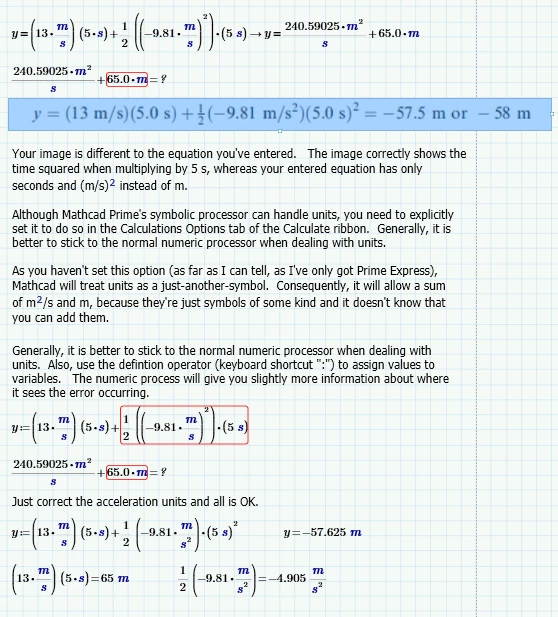


Best answer by StuartBruff

@RG_10050841 wrote:

Hi, 

I'm trying to input this equation into mathcad, but I keep coming into the problem of incompatible units. Thanks for the help. This is also my first time exploring physics so it may equally be my fault. The equation is in the image attached.


2021 11 21 A.png


Mathcad Prime Express 7 worksheet attached.


Stuart


Edit:  The end of my 3rd paragraph should read "... and it doesn't know you can't add them".

3 replies

23-Emerald V
November 21, 2021

@RG_10050841 wrote:

Hi, 

I'm trying to input this equation into mathcad, but I keep coming into the problem of incompatible units. Thanks for the help. This is also my first time exploring physics so it may equally be my fault. The equation is in the image attached.


2021 11 21 A.png


Mathcad Prime Express 7 worksheet attached.


Stuart


Edit:  The end of my 3rd paragraph should read "... and it doesn't know you can't add them".

1-Visitor
November 21, 2021

Thank you! I am very fresh to the software and there is a strong chance I'm an idiot. Thank you for your help in my struggles.


R

23-Emerald V
November 21, 2021

@RG_10050841 wrote:

Thank you! I am very fresh to the software and there is a strong chance I'm an idiot. Thank you for your help in my struggles.


No worries.  One of the main ideas for this Community is to help people get over the initial learning barriers.  Take comfort from the fact that you are not the first person to have this problem and are very unlikely to be the last.


Sometimes even the experienced can puzzle over some error or unexpected/inconsistent outcomes!   (My bête noire is forgetting that the vectorize operator doesn't apply to the matrix transposition operator 😖)


Stuart

25-Diamond I
November 21, 2021

Additionally to what Stuart already explained in detail you may consider using the built-in gravity constant g:

Werner_E_0-1637501378066.png

Please also note that to assign a variable (like y) a value, you have to use the assignment or definition operator (":=") and not the comparison equal to (the fat "=") as you did.

3-Newcomer
January 27, 2022

Hi my name is Mike Plunkett and I have been using MathCad for at least 20 years. I just got MathCad 7 and love it. Can you tell me how to make US my domain

unit.  For example, when I open MathCad 7 it goes to SI unit all the time, how can I get it to go to USCI  unit all the time.


Mike Plunkett

23-Emerald V
January 27, 2022

@MP_10184135 wrote:

Hi my name is Mike Plunkett and I have been using MathCad for at least 20 years. I just got MathCad 7 and love it. Can you tell me how to make US my domain

unit.  For example, when I open MathCad 7 it goes to SI unit all the time, how can I get it to go to USCI  unit all the time.


Hi Mike,


Try this.  Under the Math tab in the Ribbon, select Units then choose the USCS system in the Unit System: drop down.  Seems to work.


StuartBruff_0-1643297419481.png


Stuart

3-Newcomer
January 27, 2022
Stuart: I tried just what you said went to the *Math tab,* then the
*unit System
then use the pull down menu and hit USCS*

So for the calculation, I'm working on it stays on USCS, BUT when I open
another calculation in my file it goes back to SI units??

Mike Plunkett