
23-Emerald V
September 20, 2021
Question

Recursion Bug 2021 09 20

  • September 20, 2021
  • 3 replies
  • 3231 views
Under Mathcad Prime 7.0 and Mathcad Express 7.0, this worksheet causes Mathcad to either lock up or to stop running (just disappears) when the first 2 "integrate" function calls (highlighted in orange) are evaluated.
The 2 regions are disabled upon loading.
 
  • Enabling either region by itself and calculating the worksheet results in an expected message, "This expression cannot be evaluated.  It may have resulted in an overflow or infinite recursion.".
  • Enabling both regions causes Mathcad to fail to respond to user input for a short, but variable period of time, before crashing.   Usually, Mathcad just disappears and is present in neither Task Manager's Process List or Details List.
The regions below (in the worksheet) are an extract from a Mathcad Express 6.0 worksheet, which ran without problem under Mathcad Express 6.0.
 
I'm running Mathcad under Windows 10 Professional on a Lenovo T450p equipped with 16 GiB RAM.
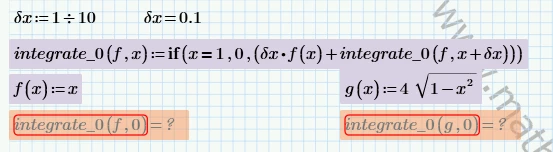
 
2021 09 20 A.png
 
Stuart

3 replies

23-Emerald IV
September 20, 2021

Your machine may be too fast, or did you (un-)set simultaneous (multithreading) calculation?

Anyway, if I load your file, select both equations and "Enable Region" I see the left one calculating until the 'infinite loop' error, then the right one follows the same..

Ah, after some playing I found that setting 'Approximate equality' will have Prime find a numerical result. And (un-)setting that and/or multithreading will have Prime trying to calculate both equations simultaneously after which it does crash.


And Prime 4 does the same. I didn't test Prime6 (yet). Prime 4 file attached.

I suspect the problem lies fully with 'multithreading'...


Success!
Luc

23-Emerald V
September 20, 2021

Interesting.   Thanks, Luc.


It would appear as if the multithreading is the cause of the bug (yes, bug, multithreading shouldn't cause Mathcad to lock up or crash ... unless someone wishes to claim it's an 'undocumented feature'!).   Turning multithreading off 'cured' the problem in my main worksheet, but I regard it as a workaround, not a true solution.   


The recursion failures are quite deliberate and demonstrate both the need to take care both with recursion termination and numerical round-off effects.   Consequently, turning on approximate Approximate Equality isn't an option.


Cheers,


Stuart


PS.  My Lenovo's ancient by computer standards.  It's running a 4th-generation, 2-core i5, working with DDR3L RAM.   According to my sons, it should be in a museum ... as should I and the 2012 MacBook Pro I'm writing this response on.

23-Emerald IV
September 20, 2021

I fully agree: It's a bug.


By that standard my computer is antique: AMD Athlon 64 X2 dual core 3800+, 2 GHz, 4GB. It initially ran WinXP.


Luc

ttokoro
21-Topaz I
21-Topaz I
September 21, 2021

X=0 ->    x>= 0  then dx=0.1 is  evaluated.  


image.pngimage.pngimage.png

image.pngimage.pngimage.png

image.pngimage.pngimage.png

t.t.
23-Emerald V
September 21, 2021

Thanks for the comment.  The function form was deliberate to show up the numerical error.   I note that you've hit Mathcad Prime's recursion depth limit for δx = 0.0001 (n=10,000) - the depth limit is about 4,500, hence the error.


Stuart

23-Emerald V
September 21, 2021

Oh, slip of the keyboard, there ... the PC is a T540p, not a T450p.