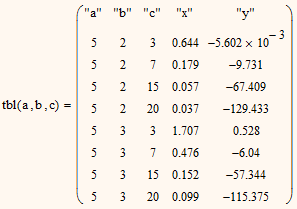
Results for multiple input cases
I am a new user to MathCAD 15. I really like the software since it displays equations in easy-to-read format and allows you to easily add text for documentation. However, it seems to me that the software (as I use it) is really only useful for "single" calculations, where you are only interested in one result.
I will often input a bunch of equations, and then go back and change some of my input variables to see how it affects my results. Basically, like a sensitivity analysis. Is there any way to do this in a way that lets you compare the results side-by-side? I will sometimes use a matrix or vector for one of my input variables, and simply put various values that I want to vary into it. This only works in certain instances though, since if you multiply two matrices together it gives a scalar result. I have tried using range variables for this, but I can't seem to get range variables to work in most of my equations...I will get an error about dimensional ranges requiring second data sets or something.
To try and explain what I want to do a bit better...let's say I have the following variables and equations, and I want to see the answers for "x" and "y" side-by-side for all of the different values of a, b, and c (and to see which values of a/b/c were used to arrive at said result):
a=5
b=2 or 3
c=3, 7, 15, or 20
x=sqrt([5+a-(b^5))]/(1-b*c^3)
y=(0.45*x^0.3)-0.4*(c-b)^2
If you reply to help, please do not post Mathcad worksheets, as I will be unable to download them. I normally switch over to Excel of TKSolver when I need to do this, but if I could easily do it within MathCAD itself it would make my life alot easier.