4-Participant
February 26, 2023
Solved

shaft deflections in mathcad

  • February 26, 2023
  • 3 replies
  • 4582 views

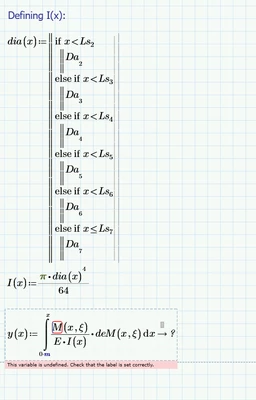
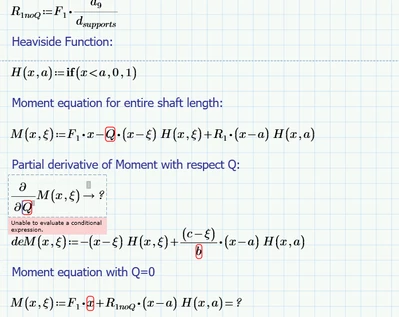
Hi Guys, need your help!. I am trying to create a spreadsheet in mathcad to calculate shaft. So far, I've been able to create shear and moment diagrams for the kength of the shaft using singularity functions. Now, I am stucked in deflections and slope. I am considering Castigliano's theorem to do it without success.... Castigliano's theorem uses a Heaviside Function and dummy loads at any point on the length of the beam/shaft... First, I defined the heaviside function and then put into the moment equation but then I couldnt do the partial derivate of this equation with respect  the dummy load Q, so I had to do it manually (this way the spreadsheet is no longer parametric and will create errors if I change some inputs values). Then when having all the equations to go for integration, it seems that something is undefined.. 
 

CA_7119170_0-1677424609557.png


CA_7119170_1-1677424654946.png


do you think there is a fancy way to do this?. At this point I am bit frustraded I don't know where the problem is..


Another thing is,  because Castigliano's Theorem needs of a secondary axis, I am not pretty sure how I am going to use when trying to plot the diagram. Do I need 2 variable ranges? x:0...L and x':0..L


Please let me know, and thanks in advance


Best answer by Fred_Kohlhepp

Different Method, just for fun  Prime 4.0 Express

3 replies

23-Emerald IV
February 26, 2023

Welcome to this forum.

1. You cannot differentiate the if()  function, so your definition of H will not work. Fortunately you don't need to define the Heaviside step function, it's built- in as:

LucMeekes_0-1677425794492.png

If you need it to step at any other point then 0, say a, then use:

LucMeekes_3-1677426397212.png


An example with a=2:

LucMeekes_4-1677426405128.png

And the built-in can be differentiated, although the result generally will contain the delta function for which there is nu numerical functionality defined in Prime.

LucMeekes_5-1677427198096.png


2. Your variable Q is undefined. If you want to differentiate a function to a particular variable, that variable had better be defined as a (formal) parameter/variable to that function. So apart from x and xi, M should also be a function of Q, and I guess R1 should also be a function of that variable.


3. I guess something similar holds true for your variable a.


4. While there is some support in prime for symbolic operations where variables have numeric values, even with units, it is generally better to first do all symbolic operations and then fill in the numeric values.


5. Be careful with the constant (?) c in your definition of R1. At present it's undefined, so Prime has a tendency to autolabel it to a constant, then it becomes green, and its value equal to the speed of light in vacuum...


Success!
Luc

4-Participant
February 26, 2023

Hi Luc, thanks for your help!. where can I find this built-in function CA_7119170_1-1677439108484.png?


c and a variables are actually errors, they shouldn't be there, they suppose to be the distance where the force is applied, sorry about that. but yes generally speaking I got your point!


4-Participant
February 26, 2023

just to clarify on c and a errors, The correct equation must be:


CA_7119170_2-1677439524427.png


23-Emerald IV
February 26, 2023

The symbolic approach might look like:

LucMeekes_0-1677436970787.png

LucMeekes_4-1677437075530.png

Then

LucMeekes_5-1677437151953.png


Success!
Luc

4-Participant
March 9, 2023

Luc, I have a question for you.. do you know how can I translate this logic (image below) into mathcad?


CA_7119170_3-1678380324824.png


I've created a program to emulate this as shown below:


CA_7119170_1-1678379464156.png


but when I try to plot this together the general equation, the curve looks like this:


CA_7119170_2-1678379547805.png


which is wrong and I am assuming that the error is somewhere in the program to determine diam(x)


would you please help me with these one?

25-Diamond I
March 9, 2023

Can't comment on the curve, but your function dia(x) looks good to me. Apart from the fact that it does not return a value for x>=315.

Furthermore I don't understand why you start with index 2 and not with index 1 (I assume you have set ORIGIN to 1 ?)


You may give a lookup function a try. The following suggestion also fails for x>=315 🙂

Werner_E_1-1678384613094.png


23-Emerald I
March 12, 2023

Different Method, just for fun  Prime 4.0 Express

4-Participant
March 12, 2023

Hey Fred!, this is so cool, I just need to understand a bit the process in the region at top of the spreasheet.. Why do I need this? to create the Linterp and solve for the constants of integration? or if this something else?.. will this work if I put more forces acting on the shaft?

23-Emerald I
March 13, 2023

 I just need to understand a bit the process in the region at top of the spreasheet.. Why do I need this? to create the Linterp and solve for the constants of integration?

I have only Express, the free version of Mathcad, the "premium" functions (like 'Re', 'Im', 'mean', 'Linterp' etc. are disabled.  The closed region (the red line) at the top of the sheet contains the fabricated replacements for some of those functions, as well as some additional features like the ability to add gridlines to the built-in plots.  If you have a full version of Prime you wouldn't need that region.


will this work if I put more forces acting on the shaft?


The math is basic.  The differential equation for deflection of a beam is: 

Fred_Kohlhepp_0-1678672418169.png

You need an equation for the shear in the shaft; your case with two supports and one load is simple.  Then moment is the integral of shear.

Fred_Kohlhepp_1-1678672660912.png

Now slope is the integral of moment, but your inertia is also a function of position.  I could get Mathcad to compute the slope but it's a fairly nasty looking graph:

Fred_Kohlhepp_2-1678672877593.png

So I elected to digitize a vector of points and use trapezoidal integration for both slope and displacement.  But (remember your calculus) each integration generates an unknow constant, so we need to use the available constraints to find those constants for this specific case.  The deflection at the supports must be zero, so:

Fred_Kohlhepp_3-1678673288828.png

If you have a full version of Prime (your sheet with programming shows you must) you could use a solve block to do this problem without all the hoopla!  But solve blocks are "premium features"!