1-Visitor
November 6, 2014
Solved

Solution extremely sensitive to guess value

  • November 6, 2014
  • 2 replies
  • 12342 views

Hello All

I am doing a minimization of the torque in mathcad and the solution that i am getting is heavily influenced by the guess values and each time I change the guess value a,b etc even by a small amount,it gives me a different answer. I really am not sure why it is doing that and also how am I going to rectify it.I have enclosed my worksheet . Any help would be greatly appreciated

Best answer by Werner_E

Vishniu Gopalakrishnan wrote:

Hello werner

I would be very grateful if you could tell me how exactly do I implement the function check on TT?. I thought about it today but dont know how to implement it. I will check if I can find additional constraints so that i dont have to do the function check on TT

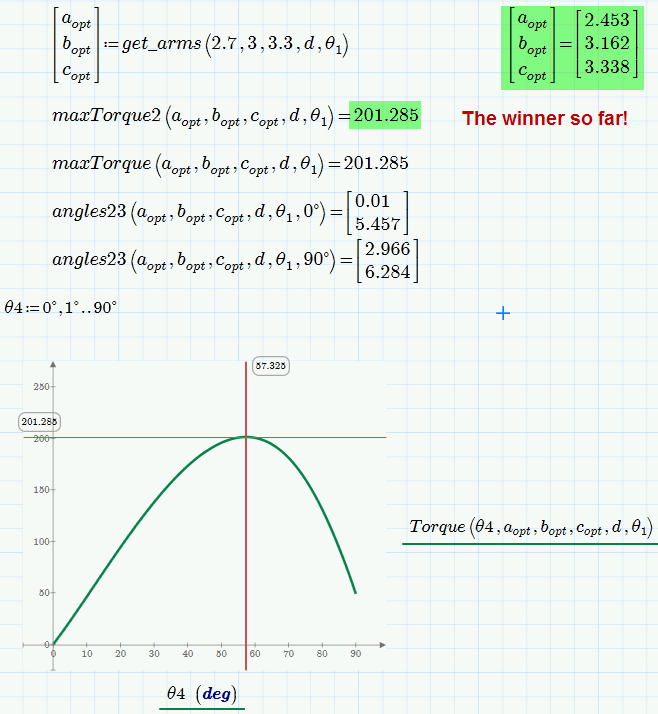
I tried a different approach in the attached sheet. It is not assumed here that the max torque will appear at 60° but is correctly calculated using a solve block. This significantly increases calculation time in the final solve block.

I also tried to implement the aforementioned quick hack to avoid invalid solutions but I still guess that checking the math of the geometry and incuding meaningful constraints would be the better approach.

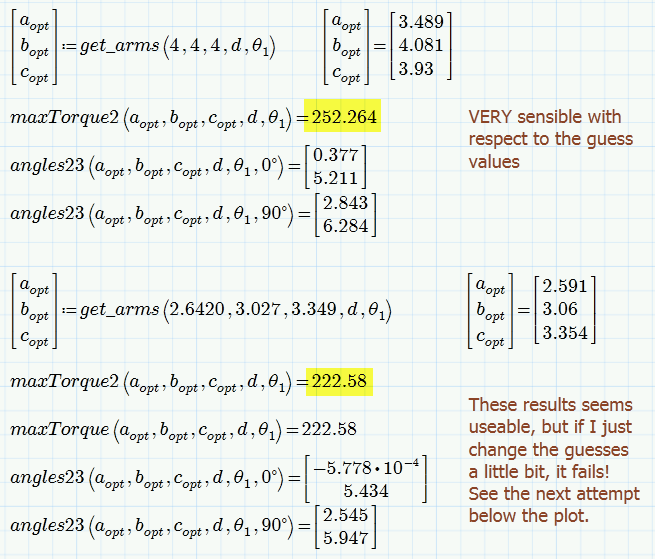
Unfortunately the end result of my efforts is a bit unsatisfactory as we still get invalid result in some cases and the solve block is quite sensible wrt the guess values.

Nevertheless I think the results should be useable.

You may play around with the constraint 2<a<5 and of course with the guess values.

I had assumed that the values are valid if I get a solution for theta2 and theta3 for theta4=0 and theta4=90°. I once came up with a combination of arm lengths which will be fail only for theta4 in approx. 7° to 20°. This case would not be cought by my routine and I can't remember what the values for a,b and c were.

Regrettably I am lacking the time to further investigate but maybe you or someone else here can come up with something a bit more stable and less sensible.

Good luck!
1.png

2.png

2 replies

25-Diamond I
November 6, 2014

Your objective function seems to be very flat. A lot of combination of parameters yield results which are very close.

What counts is the value of the objective function when fed with the optimized arguments. To Mathcads numeric it does not make much difference if the value of T is -1*10^-31 or +2*10-25. Even decreasing the values of TOL and CTOL doesn't change that much.

You also get slightly different result if you don't change anything but simply recalculate the worksheet (Ctrl-F9). .-)

So change your guesses and watch the result of T(..) - its always close around zero, no matter how much the absolute values of the arguments may be. If thats an issue you might consider scaling your function (multiply by 10^20 or higher, for example).

I have omitted the constraint for d (you don't solve for it) and have added a guess for m (you solve for it) and als added a as argument of T as it seems you want to solve for it, too. You might do the same with theta1 if thats something you wanted to achieve.

BTW, If m should be dependent on c you would have to write it that way. I haven't done so because its not clear to me what your goal is.

You also have to be aware that the constraints are soft constraints. You see that in the picture looking at the result of theta4 which is negative. If a constraint is very important for you you may consider "weighting" it by multiplying it with a large number. So you may write something like

2.png

but of course then other constraints might get out of range. Mathcad just tries to get a good overall fit regarding the minimization of your objective function and the given constraints. So doubling a constraints as I had done in another thread of yours can change the result. The effect looks not always logical to us.

1.png

1-Visitor
November 7, 2014

Hello Werner

Thank you so much for getting back to me. Actually my objective is to adjust a and c to minimize the maximum torque(T) that I have got in mathcad worksheet, mathcadtoggleprog2 which I have enclosed.The T which is the objective function was obtained after solving the system of equations in the worksheet mathcadtoggleprog2.When I attempt to minimize in the worksheet mathcadoptimizationtrial_WE_1, I am getting an erroneous answer a=0 which is basically an arm length.I really dont know why its doing that. i have also enclosed the worsheet where I did the minimization based on the changes you suggested.Any help would be greatly appreciated

25-Diamond I
November 7, 2014

Vishniu Gopalakrishnan wrote:

Hello Werner

Thank you so much for getting back to me. Actually my objective is to adjust a and c to minimize the maximum torque(T) that I have got

So you don't want to change/optimize the three theta angles (2,3,4)? Just a and c?

When I attempt to minimize in the worksheet mathcadoptimizationtrial_WE_1, I am getting an erroneous answer a=0 which is basically an arm length.I really dont know why its doing that.

Because with the values (a, c, and the specific angles) minimize() comes up with, you get torque T is zero and that seems to be a valid minimium.

24-Ruby IV
November 7, 2014