1-Visitor
February 8, 2022
Solved

Solve an equation

  • February 8, 2022
  • 2 replies
  • 1397 views

Hi, 

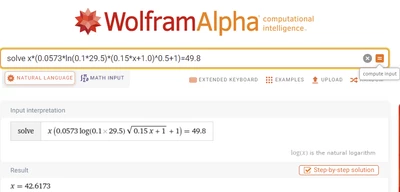
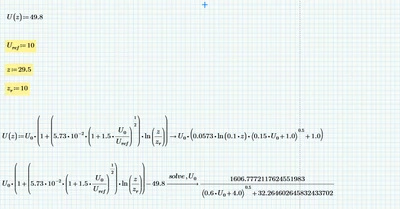
I need to solve this equation. I tried the solve function to solve it, but it does not work. I managed to solve it with wolfram,  please see the pictures below. 
JA_9802927_0-1644362072729.png

JA_9802927_1-1644362168110.png

Is there a way I can solve this? 


Best answer by Werner_E

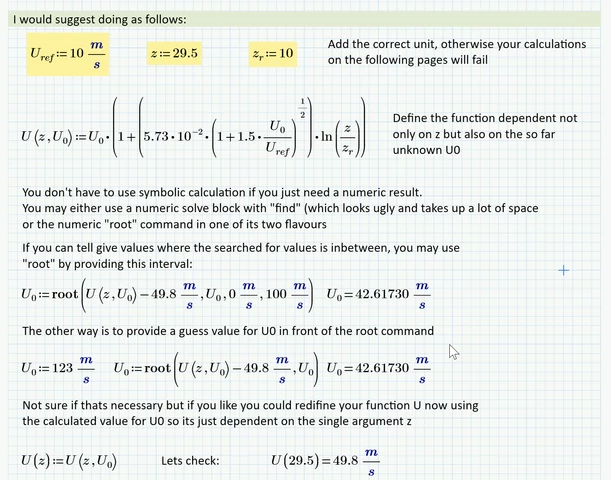
As ttokoro already wrote the reason your attempt is failing is Primes auto-label "feature". Its quite often a PITA, especially when you are using symbolic calculations. In the attached file you find the corrected version - manually all occurencies of U.0 are labeled the same - either all "-" (meaning "automatic") or all "variable".

But as you are just looking for a numeric result, I would suggest not using the symbolic engine at all!
Prime provides two numeric means to solve an equation numerically - either use  a solve block or use the "root" command. The solve block takes up more space and looks ugly in Prime but its good if you have additional constraints. In your case I would suggest using the "root" command.
Furthermore you should use units throughout - thats one of the strengths of Mathcad!

More details in the attached sheet

Werner_E_0-1644372345018.png


2 replies

ttokoro
21-Topaz I
21-Topaz I
February 8, 2022

ttokoro_0-1644364262182.png


Change all Uo lavel to variable.

t.t.
Werner_E25-Diamond IAnswer
25-Diamond I
February 9, 2022

As ttokoro already wrote the reason your attempt is failing is Primes auto-label "feature". Its quite often a PITA, especially when you are using symbolic calculations. In the attached file you find the corrected version - manually all occurencies of U.0 are labeled the same - either all "-" (meaning "automatic") or all "variable".

But as you are just looking for a numeric result, I would suggest not using the symbolic engine at all!
Prime provides two numeric means to solve an equation numerically - either use  a solve block or use the "root" command. The solve block takes up more space and looks ugly in Prime but its good if you have additional constraints. In your case I would suggest using the "root" command.
Furthermore you should use units throughout - thats one of the strengths of Mathcad!

More details in the attached sheet

Werner_E_0-1644372345018.png