

16-Pearl
January 26, 2017
Question

Solve block problem (3.1)

  • January 26, 2017
  • 4 replies
  • 5581 views

I have what I thought was a fairly simple problem, but it is giving me all sorts of problems converging.  Background: I'm solving for flow and forces on a valve to find conditions as the valve strokes.  So, I have flow through a series of orifices (solving for an intermediate pressure) and those pressures lead to forces that must balance against other forces (e.g. a spring).  So, it solves that without any issue.  Then I want to get more complicated and I use the solve block to calculate a simple parameter like flow velocity - then it starts having trouble.  Note, velocity doesn't affect the flow or force equations - I'm just looking for a value. Sometimes it will solve it, but I have to get the guesses right on.  So, am I not formulating this right?   The blocks in red are what cause a problem when I enable them.  I've tried many ways of entering the guess values but nothing seems very robust. Thanks!
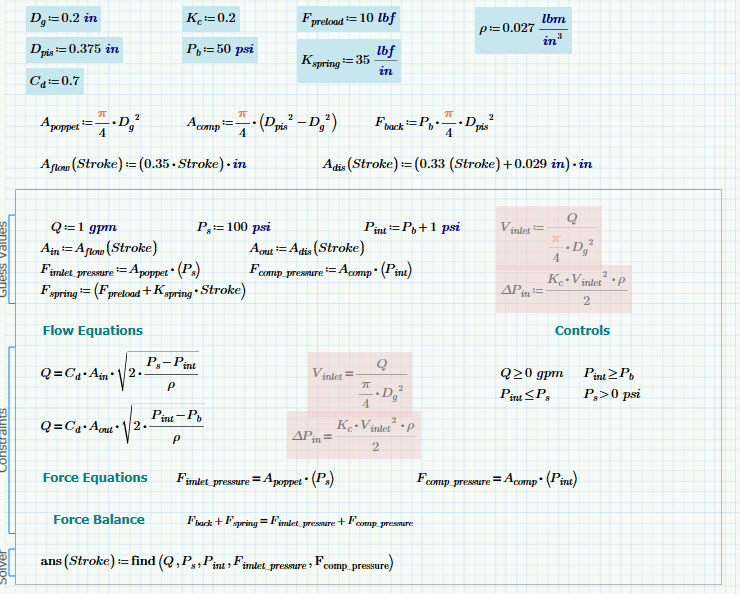
snapshot1.jpg

3.1 and pdf attached.

4 replies

25-Diamond I
January 26, 2017

It looks to me that the red areas should not be insider the solve block as the values can be calculated after the solve block.

You may create a function ans2 which first call ans an then calculates the two values.

But I guess on the other hand that those read areas should not do any harm either.

Do you mean that you get a continuous curve in the last plot if you delete the red areas and the last two entries in the find statement?

DJF16-PearlAuthor
16-Pearl
January 26, 2017

Thanks Werner.  Unfortunately there is a bit more to  the problem than what I show here that would prevent ans2 from working.  Eventually, V_inlet and it's partner DP_in would get fed back into lower the value of Ps (so DP_in is an inlet loss).  However, since I (or mathcad) struggle at this simple stage I don't have any better results with that approach even if its a true iterative problem at that point.  So I was tracing everything backwards to find when things go awry.  While it's possible they aren't necessarily the same problem, I thought this was worthy of posting since it seems to be misbehaving.   As to your second point - yes - if I delete the areas in red I get a continuous curve (it would then be identical to the first solve block). 

25-Diamond I
January 26, 2017

Unfortunately I can't read P3.1 files, so I can't play around with it.

But on first sight it looks like a bug.

Would be interesting to see if it is possible to vastly simplify the solve block and nonetheless reproduce that erroneous behavior.

Some ideas:

- Have you tried to play with the settings of TOL and CTOL?

- If you rewrite the whole thing just for research to work without units - is the effect still there?

24-Ruby IV
January 26, 2017

You have solution but not for all points of the range variable x. And some points has wrong solution.

See in the book Thermal  Engineering studies with Excel, Mathcad and Internet the Fig 17.14 here Study 17. Cogeneration (CHP), trigeneration (CCHP) and quadrogeneration (CCHPI) or  how  much  of  mathematic is contained in thermal engineering

I have had same problem for one Chemical task and must use not the Given-Find block but own program with the method of successive approximations and root function.

Valve-1.png

DJF16-PearlAuthor
16-Pearl
January 29, 2017

Valery,

I do apologize but I'm not sure I understand where you are trying to lead me.  Successive approximation isn't something I've played with before.  (Just a hunch, but did you attach the correct file?  It doesn't seem to contain your posted solution so I'm not sure how to go down your proposed path.  But I'm eager to learn and so far google hasn't shown me what I need to be doing.)   

Thank you.

21-Topaz II
January 26, 2017

Hi dferry,

If the initial guess of "Stroke" is undefined, so are Ain and Aout. I am amazed that there are results.

stroke.jpg

24-Ruby IV
January 26, 2017

F.M. написал(а):

Hi dferry,

If the initial guess of "Stroke" is undefined, so are Ain and Aout. I am amazed that there are results.

stroke.jpg

Sorry - all is correct - the find function returns not a value but a function with the argument Stoke.

21-Topaz II
January 26, 2017

Thanks!  there is always time to learn new things...

21-Topaz II
January 28, 2017

What surprises me is that in the solve block, Q is defined in two different ways. So I made a change ....

valve.jpg

DJF16-PearlAuthor
16-Pearl
January 29, 2017

The problem there is that Q0 isn't resolved and remains as the guessed value (1 gpm).  Switching Q1 = Q2 to a constrain (instead of a guess) and adding it to the FIND doesn't work out too well.

bad.jpg

21-Topaz II
January 29, 2017

valve0.jpg

To give you a complete help I should know the analytical study of the problem. Directly addressing the problem on the worksheet, we go groping. The best way to solve a problem that creates others, is to start all over again being a little more careful.

Bye

F.M.