1-Visitor
November 29, 2022
Solved

Solver giving solution for one variable but not for a different but similar variable

  • November 29, 2022
  • 1 reply
  • 4012 views

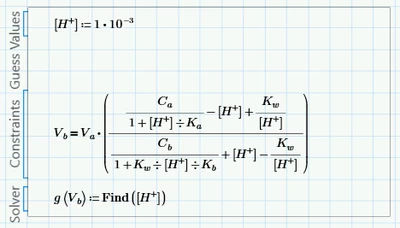
I have a solver block with an equation and a function

PN_10451271_0-1669741741213.png

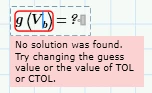
Further down the worksheet I define two ranges of values, x and Vb. Both ranges have values in the range 0-20.  g(x) returns values but g(Vb) shows as 

PN_10451271_1-1669741927939.png

I am attaching the worksheet and an Excel workbook which contains the expected results.

I would also like to use WRITEEXCEL to output the values of x and g(x) but I can't get that to work either.


Best answer by Werner_E

> I am not sure if I understand you correctly, I was putting this below the solver block

When you wrote "Of your two suggestions, I prefer the second" I thought you were talking about my suggestion of defining a new function gg(Vb):=-log(g(Vb)) below the solve block which defines function g. A function which calls the solve block function g and using NO vectorization. All these functions are setup to deal with single scalar variables and are just later called vectorized with a vector of argument values. It can be seen in the picture I added to that post.


> What I thought I could do was add a second constraint like 

You can, but you would have to use the boolean equal  (the fat "=") and because you now have two unknowns, you would have to provide guesses for both and also solve for both, even though you are only interested in on of them.

Solving for both would create a function which returns a 2x1 vector (with H+ and ph) and as you are interested in pH only you would again have to define a further function which calls this solve block function and selects the desired value only. So there is no benefit compared to my suggestion with the follow up function gg(Vb).


By the way, is there a way to copy and paste something that you have written into my reply and show that it is a quote from your message?


Yes, but partial quoting is a bit cumbersome. You can use the quote button in the menu of the reply window

Werner_E_0-1669828145126.png

to add the whole post you are replying to and then delete the parts you don't need. Its often easier for me to simply copy and paste the line I'd like to quote and add a "greater than" character in front (which is what I am used to from another forum which does not offer any quoting functionality) as I did in the first line of this reply.

1 reply

PaulN1-VisitorAuthor
1-Visitor
November 29, 2022

My apologies, the spreadsheet shows pH values instead of [H+] values. Have attached an amended spreadsheet.

23-Emerald IV
November 29, 2022

By evaluating the ranges you defined for the part of Vb, you've changed the ranges into vectors,

Seems that Prime wants you to vectorise the call to g(Vb):

LucMeekes_0-1669747886548.png

Look up vectorise (in the bottom right corner of the operators, tableau) and see your result.

Then this could be the plot:

LucMeekes_1-1669748057813.png

Success!
Luc

PaulN1-VisitorAuthor
1-Visitor
November 29, 2022

Thank you, Luc. I'm not sure why the vectorisation is necessary but obviously it is.  Anyway, I then used 

PN_10451271_0-1669761317650.png

PN_10451271_1-1669761384814.png

I had to experiment with different guess values in order to get the correct results over the whole range of Vb but 1E-10 seems to work well and I can get a plot like this

PN_10451271_2-1669761974664.png

This is my first Mathcad project so I would appreciate a little more help.  I would like to calculate pH directly rather than solving for H+ and then converting to pH and I am not sure what changes I would need to make in order to accomplish this.