
1-Visitor
February 27, 2014
Solved

Solving System of Equations Within a Program Block

  • February 27, 2014
  • 1 reply
  • 3240 views

Hi all,

I am fairly new to Mathcad, and am attempting to solving a 2-D system of equations within a program block as shown below. The section of code that I am attempting to use to solve my SOE begins with

'Given'

and ends with

'vvec <-- Find(V11val,V21val)'

and unfortunately this isn't working. 'vvec' is currently highlighted in red and when I hover my mouse over it, a message is displayed saying 'This variable is undefined'.
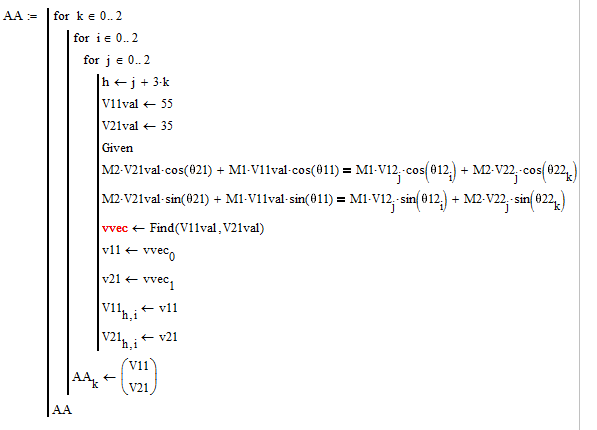
SOE+pic.png

If I use these same 4 lines of code in a regular math block rather than in a program block, they work just fine.

I'm wondering: it is necessary to use a different format when solving an SOE within a program block?

Thanks for any help!

Best answer by Werner_E

You can't define a solve block inside a program, but you can turn a solve block defined outside the program into a function depending on the parameters V21, V11, etc. and use that function inside your program.

BTW, the local variable h seems to be not in use and so could be omitted.

Please send a fully working sheet - we miss all the values of your variables M1, M2, various theta, etc.

1 reply

24-Ruby IV
February 27, 2014

You can create the function vvec(...):=find(...) out of the program and call it in the program.

Send please the sheet and wewill try to edit it.

1-Visitor
February 27, 2014

Thanks for your reply.

This is something that I do not know how to do. Could you please give me an example of how to set up the function outside of the program, and then call it inside the program?

Message was edited by: Keilan Freeman

Werner_E25-Diamond IAnswer
25-Diamond I
February 27, 2014

You can't define a solve block inside a program, but you can turn a solve block defined outside the program into a function depending on the parameters V21, V11, etc. and use that function inside your program.

BTW, the local variable h seems to be not in use and so could be omitted.

Please send a fully working sheet - we miss all the values of your variables M1, M2, various theta, etc.