1-Visitor
December 19, 2015
Solved

Symbolic value propigation

  • December 19, 2015
  • 4 replies
  • 2285 views

Can a variable's symbolically obtained value be propagated to future uses of that variable?

I want my second expression to see c2 as zero.
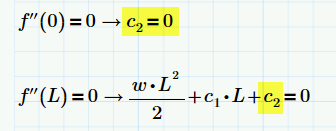
12-19-2015 1-52-28 PM.png

Best answer by RichardJ

Use a numeric assignment with the symbolic solve:

To attach a file click on "Use advanced editor" at the top right of the edit dialog (it's not very obvious!).

4 replies

25-Diamond I
December 21, 2015

Maybe that way:

There are sure other ways but you have to be more precise as to what you are really after at at the end.

Looks you have to solve a system of equations?

Next time please attach your worksheet, but as you are using Prime, you still have to provide a picture or a pdf printout because many of us (like me) cannot reat P3.1 files with our P.3.0 version of Prime.

WE

19-Tanzanite
December 21, 2015

Yes, but not like that. The symbolic evaluation gives f''(0) as c2. The boolean equals and the 0 have no effect at all, they are just cosmetic, so c2 has not been assigned any value. The only way to assign a value to a variable is with a numeric assignment. That can be coupled with a symbolic operation, for example a solve, but in your case I can't tell you exactly what to do without seeing more of the worksheet.

creed-21-VisitorAuthor
1-Visitor
December 21, 2015

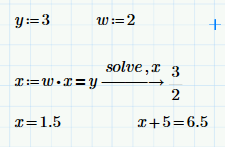
I've attached a simplified example of my question. If I want to use "x" later in my worksheet I have to redefine it after it's symbolically solved.

If my "y" or "w" variables change, the new value for "x" is no longer propagated.

Is there a technique that would keep me from refining "x" every time is value is effected?

12-21-2015 11-35-11 AM.png

*I'd add an attachment of the original file but am not seeing an option to do that, what am I missing?

RichardJ19-TanzaniteAnswer
19-Tanzanite
December 21, 2015

Use a numeric assignment with the symbolic solve:

To attach a file click on "Use advanced editor" at the top right of the edit dialog (it's not very obvious!).

1-Visitor
December 21, 2015

Perhaps you could use this general solution to your original post:

Or, if w & L are previously defined, you could use this case-specific form instead: