
1-Visitor
November 21, 2010
Question

Symbolics with float - "unapply"

  • November 21, 2010
  • 2 replies
  • 7158 views

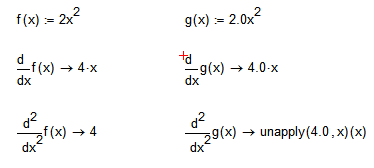
Just stumbled over a somewhat nasty effect using symbolics in conjunction with floats.

I know, that whenever you use a float the symbolic evaluation is switched to float and unfortunately there seems to be no way back and no switch/modifier to prevent this happening.

But can anybody explain the follwing effect and what does "unapply.." mean? Was not able to find the message in the help files.
DIff_Prob.png

Rag

2 replies

1-Visitor
November 21, 2010

What Mathcad version is used ?

rag1-VisitorAuthor
1-Visitor
November 21, 2010

Viktor Korobov schrieb:

What Mathcad version is used ?

Sorry! Using Version 14 M030.

19-Tanzanite
November 22, 2010

I see it in MC15 too. It's a bug.

November 22, 2010

Looks like its one of the things that version 12 didn't get wrong!!

rag1-VisitorAuthor
1-Visitor
November 22, 2010

A Westerman schrieb:

Looks like its one of the things that version 12 didn't get wrong!!

Neither does version 11.

It sure has to do with the "new" symbolic processor MuPad which replaces Maple since version 14.

The "unapply"-message most likely stems from Mupad and Mathcad is simply noncritical displaying.

The function(?) "unapply(4.0,x)(x)" probably is of an internal format which is not understood by Mathcad.

If you copy that expression (you cannot type it in) an try to evaluate it (symbolically), the statement changes(!) to "unapply(4.0,x(x))".

While I understand "apply", my English simply is not good enough to figure out what "unapply" could mean.

Rag