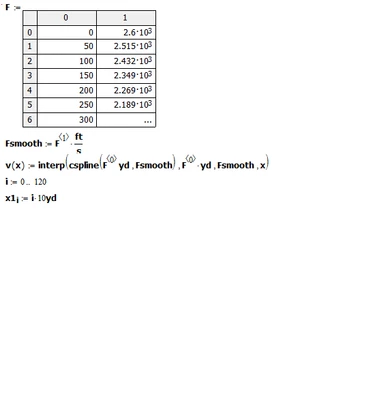
The picture shows something done in Mathcad 15 or older. To input the data and assign it to F the option "Insert-Data-Table" was used. This convenient way is not available in Prime, which I assume is what you are using.
Prime has a lot of limitations and drawbacks compared to the older real Mathcad, but in your case this can be fixed quite easily. Simply use a matrix and assign it to variable F and not a table. Tables in Prime are something completely different as they were in Mathcad.
You can create a matrix by typing Ctrl-M or via the appropriate menu. You enter a value and pressing Crtl-Space adds a second column. With Ctrl-Enter you can add rows to type in your numbers.
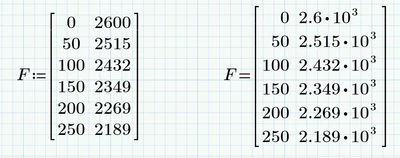
But ... if you really want to do so, you can also use a Prime table to input your data.
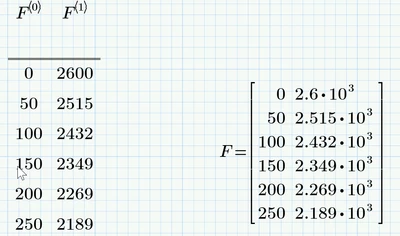
Use the menu ribbon "Matrices/Tables" - "Insert Table", chose a table with two columns and some rows (you always can add rows by pressing Ctrl-Enter). The headers of your tables must be named F<0> and F<1>, whereas F<0> means using the column selector you get by pressing Ctlr-C after typing F.
As you are using Mathcad/Prime I would suggest using units and meaningful names right from the start. You can do this by assigning the distance and velocity values separately to single vectors or by using a Prime table the way shown in the pic below. I guess there is no need anymore for the combined matrix F, but if you really need it you can always use F:=augment(dist, FSmooth). BTW, the latter would not be possible in older Mathcad versions because they won't allow values of different dimensions (length, speed) in one matrix. So even though Prime is quite inferior to the older Mathcad versions on the whole, it does have a few advantages here and there.
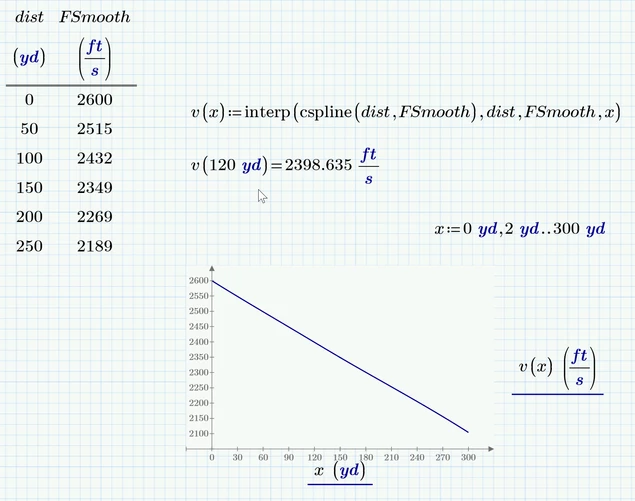
Prime6 sheet attached