7-Bedrock
February 8, 2017
Solved

Tangenta & sqrt by continued fractions

  • February 8, 2017
  • 3 replies
  • 2426 views

In the case of numbers, like tan(2), the Help provides clear information : figure after keyword confrac = number of accurate digits.

But what is the meaning of this figure in the case of the function tan(x) ?

Must confess that in the beginning it was a little bit confusing the display of the development of tan(x) by continued fractions...

(Pls. see attached)

Is there some trick to avoid the very tall vector of terms ? Probably by assigning the result of the symbolic evaluation by confrac to a variable without displaying the result...? Or would it be possible to have it in a usual table to scroll in ?

I think that for sqrt(x) and n-th root functions I have to look for in math books...

Best regards, Liv.

Best answer by Werner_E

OK, there may be a solution.

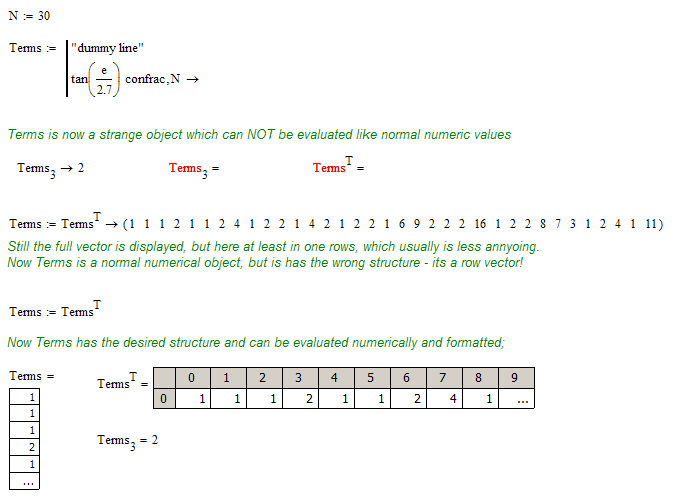
Here is a clumsy way to avoid the display of the long vertical vector other than hiding it in a collapsed region.

3 replies

25-Diamond I
February 8, 2017

Unfortunately the formatting option "table" does not apply to symbolic evaluations.

So the best I could think of is to hide the expression in a collapsed region and just show the result afterwards with numeric evaluation.

23-Emerald I
February 8, 2017

I don't really understand your question.

From Prime 3.0 help:

Liv7-BedrockAuthor
7-Bedrock
February 8, 2017

It seems that in Prime 3 symbolic confrac works better... (don't have Prime).

The display of the symbolic result in Mcd15 was confusing : don't understand the meaning of the number after the keyword in the case of a function, tan(x) in my example, since does not equal the number of terms. But probably it does in Prime 3 for functions...

Regards, Liv.

25-Diamond I
February 8, 2017

Symbolics work the very same in Prime and in real Mathcad (15 or below).

The exact meaning of the integer parameter in case of a function isn't explained in the Prime help either.

Werner_E25-Diamond IAnswer
25-Diamond I
February 8, 2017

OK, there may be a solution.

Here is a clumsy way to avoid the display of the long vertical vector other than hiding it in a collapsed region.

Liv7-BedrockAuthor
7-Bedrock
February 8, 2017

Great. The trick is worth to remember.

Don't agree : I wouldn't say clumsy, but the opposite !

Thanks a lot, Liv.