1-Visitor
September 10, 2020
Solved

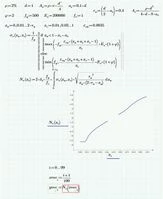
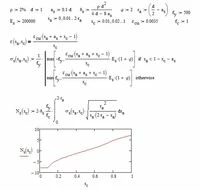
The charts look different in Mathcad 14 and Mathcad Prime 3.0.

  • September 10, 2020
  • 1 reply
  • 2503 views

Hello.

I have a problem with charts.


Everything works fine in Mathcad 14 but in Prime 3.0 i have an error like below:Mathcad Prime 3.0Mathcad Prime 3.0


Mathcad 14Mathcad 14

Is this a problem with if-else instruction or something? 

Can you help me?


Best answer by Werner_E

It may have to do with the if-else instruction and the min/max functions used there, but the main problem lies in the numeric methods used internally for the calculation of the integral.
PTC has massively changed the numeric algorithms used in Prime and praised the new ones as being much better. Perhaps this is not the case in all cases. As you can see in the following picture (right side) the integral does not converge for some arguments x.c like 0.49 or 0.51). Thats the reason for the gaps in the plot and the error you get when you try to create the vector.

If this happened in real Mathcad you could right click the integral and give another algorithm a try (which is not necessary in case of your integral because "autoselect" did a good job).
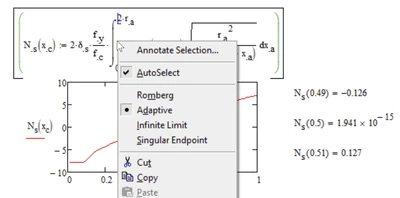
Werner_E_1-1599726300834.png


But in Prime we have no choice. If the algorithm does not work - bad luck.
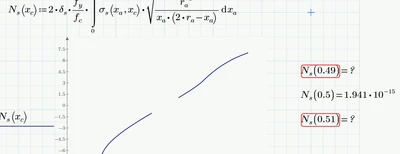
Werner_E_2-1599726345314.png

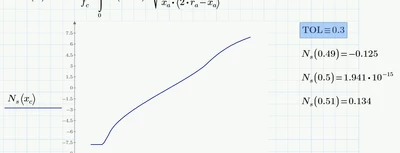
There is one way you can get the sheet to work OK in Prime, too, but its risky. You can play with the setting of the system variable TOL (you may change it in the "calculation" ribbon menu or simply assign it a value at the top of the worksheet like a normal variable). The default setting is 10^-3. If you change it to a ridiculously large value like 0.3 your sheet seems to work OK (at least in Prime 6) but you have to decide for yourself how much you trust the results now. At least I won't expect high precision. Note the difference of the results for the argument 0.51 if you compare the picture of Mathcad and the one of Prime.
 

Werner_E_0-1599726723023.png

BTW, if you set TOL to a lower value (like 10^-9) in real Mathcad, the integral fails now an then, too, and you see some gaps in the plot.


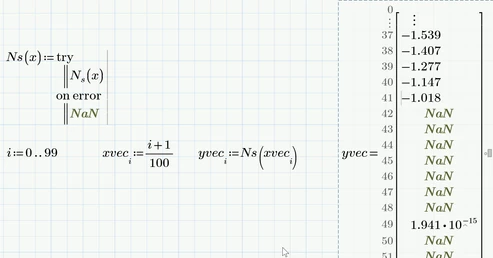
Another way to deal with the problem of the vector creation failing could be to write a wrapper function which uses the "try" command (in real mathcad its "on error") to return NaN if the calculation fails. That way the vector can be created, but it will contain a couple of NaNs. If thats a solution for you depends on what you would like to use the vector for. If its just needed to export the results to Excel, the described method should work OK. Of course you could also chose to return a string like "error" instead of NaN or anything else you think is appropriate.

Werner_E_0-1599727315593.png


1 reply

Werner_E25-Diamond IAnswer
25-Diamond I
September 10, 2020

It may have to do with the if-else instruction and the min/max functions used there, but the main problem lies in the numeric methods used internally for the calculation of the integral.
PTC has massively changed the numeric algorithms used in Prime and praised the new ones as being much better. Perhaps this is not the case in all cases. As you can see in the following picture (right side) the integral does not converge for some arguments x.c like 0.49 or 0.51). Thats the reason for the gaps in the plot and the error you get when you try to create the vector.

If this happened in real Mathcad you could right click the integral and give another algorithm a try (which is not necessary in case of your integral because "autoselect" did a good job).

Werner_E_1-1599726300834.png


But in Prime we have no choice. If the algorithm does not work - bad luck.

Werner_E_2-1599726345314.png

There is one way you can get the sheet to work OK in Prime, too, but its risky. You can play with the setting of the system variable TOL (you may change it in the "calculation" ribbon menu or simply assign it a value at the top of the worksheet like a normal variable). The default setting is 10^-3. If you change it to a ridiculously large value like 0.3 your sheet seems to work OK (at least in Prime 6) but you have to decide for yourself how much you trust the results now. At least I won't expect high precision. Note the difference of the results for the argument 0.51 if you compare the picture of Mathcad and the one of Prime.


Werner_E_0-1599726723023.png

BTW, if you set TOL to a lower value (like 10^-9) in real Mathcad, the integral fails now an then, too, and you see some gaps in the plot.


Another way to deal with the problem of the vector creation failing could be to write a wrapper function which uses the "try" command (in real mathcad its "on error") to return NaN if the calculation fails. That way the vector can be created, but it will contain a couple of NaNs. If thats a solution for you depends on what you would like to use the vector for. If its just needed to export the results to Excel, the described method should work OK. Of course you could also chose to return a string like "error" instead of NaN or anything else you think is appropriate.

Werner_E_0-1599727315593.png


Nykus1-VisitorAuthor
1-Visitor
September 10, 2020

Thank you Werner_E!


I used a TOL variable equal 0.3 and it works. 

Perhaps the result is better than in real mathcad.

 I'm not sure why this is happening but most importantly it helped.


You're doing a great job.

23-Emerald I
September 10, 2020

Perhaps the result is better than in real mathcad.


Given a choice between believing Prime or "real mathcad", most of us would believe "real mathcad" until it was proven wrong.