
20-Turquoise
August 29, 2010
Solved

TRUE OR FALSE with this calculation ?

  • August 29, 2010
  • 5 replies
  • 28280 views

Hello all,

I really don't know that TRUE OR FALSE with this calculation ? Attach File below.

Regard,

Loi.

Best answer by IRstuff

The answer is FALSE. Even Mathcad 11's symbolic processor shows: False.gif The same result comes from Mathcad 14's symbolic processor, which is from a different source, i.e., MuPad vs. Maple.
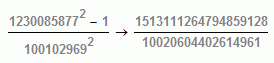
So, Mathcad's numeric processor, which is limited in its numerical precision winds up truncating the answer. The symbolic processor's floating point answer is

False2.gif

which, with careful digit counting shows that the numeric processor of almost any calculator and any normal spreadsheet program will truncate the answer to 151, but it's not. You may wish to find some aribtrary precision calculators, some of which can be downloaded from the web, to verify the results. Prime factorization in Mathcad shows the ratio to be composed of products of different primes.

5 replies

1-Visitor
August 29, 2010

Mathcad says it's true.

trueorfalse.GIF

19-Tanzanite
August 29, 2010

Mathcad also says:

Alanratio.gif

1-Visitor
August 29, 2010

Alan Stevens wrote:

Mathcad also says:

Alanratio.gif

No, Mathcad says:

trueorfalse1.GIF

MuPAD kernel (in Mathcad) says

trueorfalse2.GIF

Viktor

1-Visitor
August 29, 2010

Excel also says it's true.

151.00000

Mike

1-Visitor
August 29, 2010

.......................

MCADkakul.gif

.......................

19-Tanzanite
August 29, 2010

Look at it this way:

Alanratio2.gif

August 30, 2010

The question that needs to be asked is what definition of equality is required.

strict mathematical: exactly equal - answer is unproven but probably not (see Alan's post)

Finding a calculator that has higher resolution / precision may give more trailing zeroes but the reality is that at some point there must(?) be some inequality.

scientific:e.g better than1 part in 10^12 - yes, its good enough.

engineering: +/- 1% (usual tolerances that can be expected ...)

Andy

1-Visitor
August 30, 2010
The FPU (Floating Point Unit) is a separate part of your processor chip, dedicated to floating point (i.e., real number) arithmetics. It has been discovered that some parts of Windows 95/98 (or some drivers used by Windows) may affect the functioning of the FPU, reducing the accuracy of computations from about 19 to about 16 decimal digits.
Most applications will never notice this, as they are usually limited to the 16-digit precision of the C/C++ double type. Kalkulator, however, takes the full advantage of the built-in FPU accuracy, and this advantage is cancelled when your system's FPU performance is degraded.
Problems with the "old" Windows 95 System Agent
Microsoft admitted (in a quite understated way) that the System Agent, included with the Win95 Plus, was affecting the FPU performance. The problem has been fixed in one of the Windows 95 Service Packs, and it should not be present at all in Windows 98. The culprit was identified as one of the Windows' components, sage.dll (version 4.40.310), and the fixed version number is 4.40.311. Turning the System Agent off is also a good workaround.
Problems with other programs
This is not the end of it. Exactly the same problem may sometimes arise without the System Agent (or sage.dll) running. I have so far identified two programs interfering with the FPU and causing exactly the same symptoms:
·xwheel.exe by LCS/Telegraphics. This driver is included by many vendors with their pointing devices, touchpads in particular; probably more commonly seen on notebook computers. Removing xwheel.exe from the startup sequence fixes the FPU problem right away (in my Windows 98 tests I haven't lost any mouse functionality in the process).
·vshield.exe, a memory-resident part of the McAfee antivirus utilities. Again programs of this kind are known to cause problems often. Disabling the Virus Shield fixes the problem.
It is possible that these programs are not the real culprits here, but rather one of the Windows libraries they use; the bottom line remains the same.
Kalkulator work-around
Kalkulator runs a test for the FPU accuracy loss upon startup. If the problem is detected, the display precision setting will be limited to 16 (instead of 18) digits, and so will be the accuracy of some calculations. You will receive an appropriate warning when the FPU problem is detected the first time. If you change your system configuration (for example, by removing the offending program) and the problem goes away, the next time you run Kalkulator, it will detect this fact and give you a notice to this effect.
More on the FPU problem
You can find more details and updates on a Web page I have dedicated to it:
where you will also find a small diagnostics program checking for this condition, together with the (very brief) source code.
____________________________
Well explained by Richard & Eden
The "Machine precision" as explained in Mathematica, is 16 for Pentium IV XP , and there is a test for it it says my box is 16. There was another program causing failure of the floating point [Forge ?]. Ralston [if my recollection is correct] explained that the binary subtraction may eventually fail completely. That particular occurrence of numbers and operators will probably never happen in real engineering work, but nice to know it may cause some headache.
MCADkakul_1.gif
jmG
lvl10720-TurquoiseAuthor
20-Turquoise
August 31, 2010

Thanks all your help. Attach File below.

Regard.

Loi Le.

1-Visitor
September 1, 2010

Your question has been answered by Eden, Richard, more extensively by jmG

On my side: no need for more gyzma work sheet.

lvl10720-TurquoiseAuthor
20-Turquoise
October 29, 2010

Thanks to all who replied.

Regards,

Loi Le.