13-Aquamarine
September 20, 2022
Solved

Turning Off Labels for Solve Blocks in Prime 7/8?

  • September 20, 2022
  • 1 reply
  • 3031 views

Hi Folks,


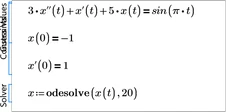
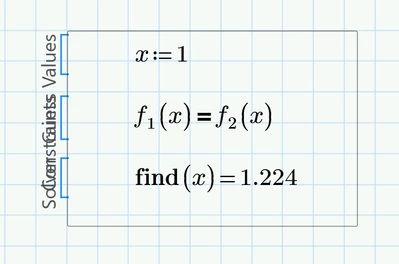
This is probably an easy one.  Is there any way to suppress the labels for solve blocks, or at least rotate them so they aren't such a mess?  The solve block works fine, but I don't want to use this in a presentation.  The examples in the documentation don't have the labels off to the left, so there must be some way to turn them off.


Thanks 😉


mfrench_0-1663679357428.png


Best answer by Werner_E

I agree that the solve blocks look quite ugly in Prime but I don't think that there is away to change this.

I am not sure which "documentation" you are referring to. To the best of my knowledge a documentation which would deserve that name does not exist - just the help pages. In real Mathcad we had a good documentation (up to MC14 even in printed form) and up to MC11 it also included a concise and large reference section.

What we see in the help pages of Prime are not solve blocks, but just the regions inside and the border you see there around them seems not to be original border of the Prime solve block. I guess this was done to be able to use them for all language versions of the help pages.

On contrary to the help in real Mathcad the help pages are not live, working Mathcad worksheets but rather only HTML pages where some expression were underlaid with the code of Prime regions which you can copy to your worksheet using the offered "Copy Expression" button.
If you copy as solve block from the help pages to a live worksheet that way, you again have the ugly display.
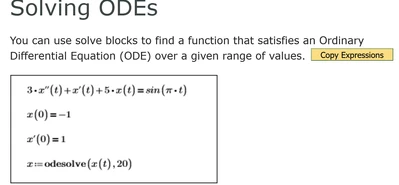
Werner_E_0-1663683280809.png  --->    Werner_E_1-1663683298170.png


For presentation you might have to resort to some trickery, I fear. You may hide the original solve block in a collapsed region and paste an edited picture of the block without the labels below. Of course it would not be a live worksheet now anymore and for me this sure would not be worth the effort.

 

1 reply

Werner_E25-Diamond IAnswer
25-Diamond I
September 20, 2022

I agree that the solve blocks look quite ugly in Prime but I don't think that there is away to change this.

I am not sure which "documentation" you are referring to. To the best of my knowledge a documentation which would deserve that name does not exist - just the help pages. In real Mathcad we had a good documentation (up to MC14 even in printed form) and up to MC11 it also included a concise and large reference section.

What we see in the help pages of Prime are not solve blocks, but just the regions inside and the border you see there around them seems not to be original border of the Prime solve block. I guess this was done to be able to use them for all language versions of the help pages.

On contrary to the help in real Mathcad the help pages are not live, working Mathcad worksheets but rather only HTML pages where some expression were underlaid with the code of Prime regions which you can copy to your worksheet using the offered "Copy Expression" button.
If you copy as solve block from the help pages to a live worksheet that way, you again have the ugly display.

Werner_E_0-1663683280809.png  --->    Werner_E_1-1663683298170.png


For presentation you might have to resort to some trickery, I fear. You may hide the original solve block in a collapsed region and paste an edited picture of the block without the labels below. Of course it would not be a live worksheet now anymore and for me this sure would not be worth the effort.
 

mfrench13-AquamarineAuthor
13-Aquamarine
September 20, 2022

Thanks for the quick reply Werner - you are such a reliable source of support.  That said, Dang, I was hoping I'd missed something.  Ah well, another reason I don't show Prime worksheets to very many people.


Do we have any idea of what they're planning to fix in the next release?


Mark


25-Diamond I
September 20, 2022


Do we have any idea of what they're planning to fix in the next release?


No. Actually I am happy that I can still use MC15 and the more I see from Prime, the less I care about that version and its "development" and "improvements".

Usually @VladimirN  is well informed and posts from time to time that kind of information. I have no idea if he already posted something about Prime 9+ but you may search for his posts in this forum.


EDIT: Just found this thread: https://community.ptc.com/t5/Mathcad/PTC-Mathcad-Prime-Roadmap-2021-update/m-p/738684

Its older than one year and so I am not sure which information still applies (apart from "don't expect too much" )