
Solved
Two problems ina MathCad15
- February 20, 2013
- 1 reply
- 1187 views

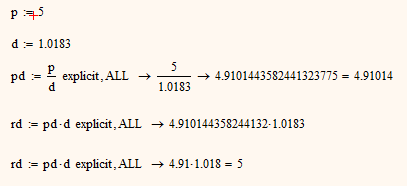
You should better post a worksheet, especially if you are using nonstandard formatting like replacing the symbolic arrow by = and hiding the keywords.
ad 2) unfortunately thats not possible in MC15 (and is not in Prime2). The only line break is when you type yourself a long expression consisting of some sums you are allowed to type Ctrl-Enter to continue in the next line. very limited.
If you need it for documentation/publication and the expression is not too large as a workaround you may try reducing the font size (which affects all math regions in the worksheet) and of course use landscape orientation.
ad 1) Two possibilities comes to my mind. The first (and undesirable) one would make use of the symbolic modifier float which affects the real precison of the whole evaluation. The second, better one, is to use the result formatting menu and check "Apply to symbolic results".
No account yet? Create an account
Enter your E-mail address. We'll send you an e-mail with instructions to reset your password.