Best answer by Werner_E

The auxiliary variable T should not be necessary.

Simply vectorize the whole expression on the right hand side of hlc:=... in your original sheet.


What you have are not called ranged but vectors.

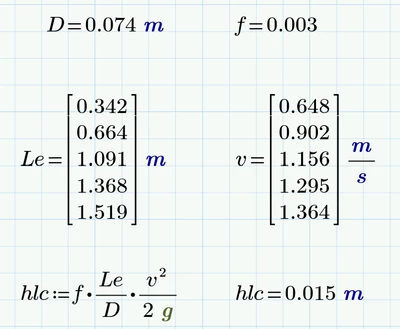
Actually the square of a vector (v^2) is not defined from a mathematical point of view. Its NOT v*v (which would be a scalar).

Instead of throwing an error Mathcad applies implicit vectorization, squaring each element of the vector and collects the result in a new vector.

Now your formula demands Prime to multiply two vectors, Le and the newly created v^2. Prime does as demanded and gives you back the vector product, which of course is just a single scalar.
You had in mind to multiply each element of the one vector by the corresponding one of the other and this is exactly what vectorization is made for.


5 replies

1-Visitor
February 14, 2021

I found a way of doing it (typically right after I posted here), it's not the neatest solution but I used vectorization to multiply the two and put that into a single variable, then used that variable in my equation instead:

JM_9356739_0-1613308925721.png


Werner_E25-Diamond IAnswer
25-Diamond I
February 14, 2021

The auxiliary variable T should not be necessary.

Simply vectorize the whole expression on the right hand side of hlc:=... in your original sheet.


What you have are not called ranged but vectors.

Actually the square of a vector (v^2) is not defined from a mathematical point of view. Its NOT v*v (which would be a scalar).

Instead of throwing an error Mathcad applies implicit vectorization, squaring each element of the vector and collects the result in a new vector.

Now your formula demands Prime to multiply two vectors, Le and the newly created v^2. Prime does as demanded and gives you back the vector product, which of course is just a single scalar.
You had in mind to multiply each element of the one vector by the corresponding one of the other and this is exactly what vectorization is made for.