

VB help!!
Hi,
I'm a newbie here so please bear with me as I'm sure someone has already covered this topic but I can't find a thread anywhere.
In a nutshell, I want to get make a textbox to change colour dependent on what answer displayed in the box.
I've just completed the MathCAD 15 course and the instructor showed an example of this working, so I asked him how to do it. He told me it was al to do with the VB script running behind the text box and sent me the script.
When I tried to insert this into my own text box script it wouldn't work.
Adding it is not a problem (copy and paste) but the problem I’m having is trying to get the script to refer to the output of a previous calculation. I don’t quite understand how VB scripts work so I’m a bit lost as to where to add my references.
This is what I’ve tried so far….
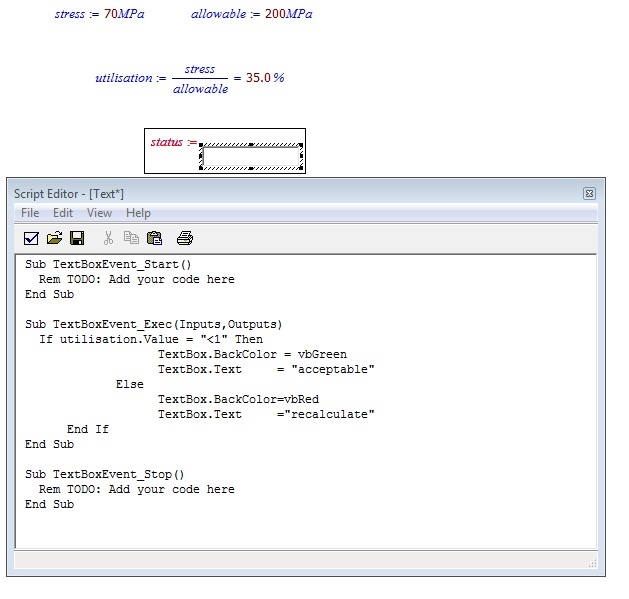
…but when I come out of the script, I get this message…
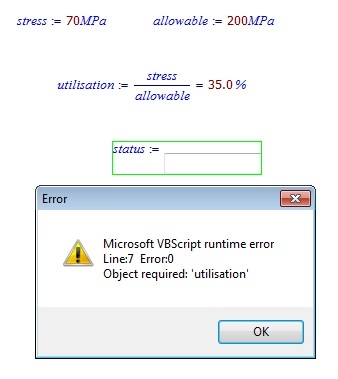
…I’m at a bit of a loss.
Can anyone suggest anything? Or is there any possibility that someone could show a simple example of how to write this script properly please?
Any help would be greatly appreciated!