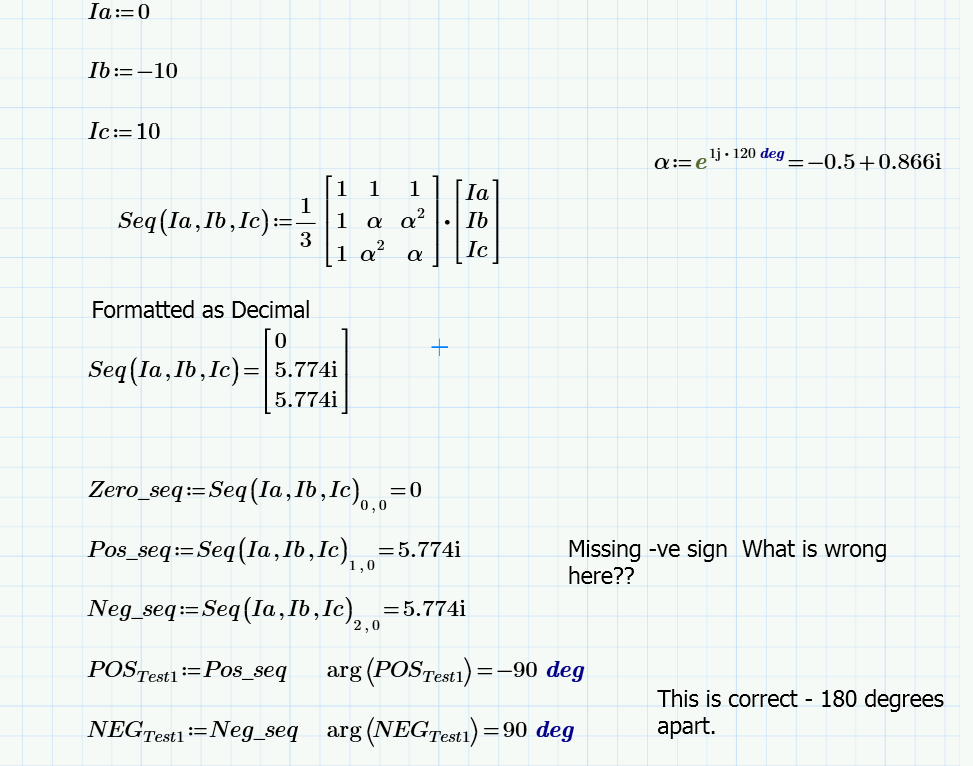
Best answer by ppal_255687

Yes. It is a bug. Worksheet sent to Mathcad Developer by our maintenance service  provider for resolution.

3 replies

23-Emerald IV
February 13, 2017

You have a point at least. This is what Mathcad 11 shows:

And this is Prime 3.1.

In both cases, the second element of the result array has a negative imaginary part. But if you change the formatting of the result to 'decimal', it changes to:

And the imaginary part of the second element is suddenly positive. Of course this does not happen in Mathcad, this only occurs in Prime...

It's a BUG!

Work-around: don't format your results to decimal.

Luc

18-Opal
February 21, 2017

From RD’s feedback, Mathcad Prime 4.0 had resolved the issue. And Prime 4.0 will release in the end this month.(Feb. 2017)

21-Topaz II
February 13, 2017

Hi ,

You could proceed  first defining the formulas and then providing the numerical values. See the following image:

missing minus sign.jpg

18-Opal
February 13, 2017

Why?

25-Diamond I
February 13, 2017

Seems that you found a bug in Prime!

It does not affect calculations but only(?) the display of results.

Whenever the real part is so small that it would be displayed as zero with the given precision, its not displayed at all (which is kind of OK) but the sign of the imaginary part is lost.

ppal_25568718-OpalAuthorAnswer
18-Opal
February 13, 2017

Yes. It is a bug. Worksheet sent to Mathcad Developer by our maintenance service  provider for resolution.

18-Opal
February 21, 2017

From RD’s feedback, Mathcad Prime 4.0 had resolved the issue. And Prime 4.0 will release in the end this month.