
1-Visitor
August 20, 2015
Solved

Where is "symbolic"->"variable"->"solve"

  • August 20, 2015
  • 1 reply
  • 1850 views

I just converted over to Prime 3.0. Before I used to use Mathcad v8.  The option that i used the mose was to craete an equation & then have Mathcad symbolically solve for the variable. In mathcad 8 I would do the following steps:

1.) define an equation with some variables, using the ctrl+= (so I get the bold =)
2.) click on the variable I wanted to solve for

3.) In the top menu bar click "symbolic", then "variable", then solve

That was it ... I can not find that in the new Prime 3
Best answer by StuartBruff

Craig Polk wrote:

I just converted over to Prime 3.0. Before I used to use Mathcad v8.  The option that i used the mose was to craete an equation & then have Mathcad symbolically solve for the variable. In mathcad 8 I would do the following steps:

1.) define an equation with some variables, using the ctrl+= (so I get the bold =)
2.) click on the variable I wanted to solve for

3.) In the top menu bar click "symbolic", then "variable", then solve

That was it ... I can not find that in the new Prime 3

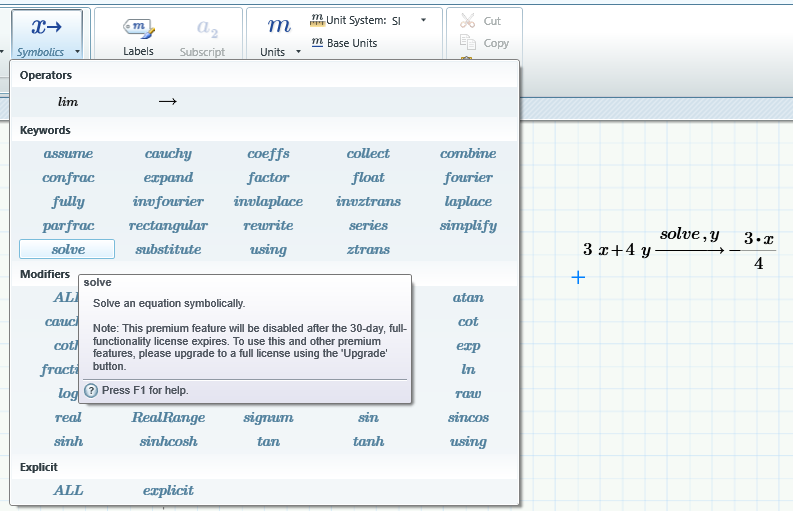
I just selected "solve" then typed ",y" after it.

Stuart

PS..  I just did something no self-respecting male engineer would ever do and looked it up in Help, and this is indeed what you have to do.  Please don't tell anybody I read the manual or I will lose face..

1 reply

23-Emerald V
August 20, 2015

Craig Polk wrote:

I just converted over to Prime 3.0. Before I used to use Mathcad v8.  The option that i used the mose was to craete an equation & then have Mathcad symbolically solve for the variable. In mathcad 8 I would do the following steps:

1.) define an equation with some variables, using the ctrl+= (so I get the bold =)
2.) click on the variable I wanted to solve for

3.) In the top menu bar click "symbolic", then "variable", then solve

That was it ... I can not find that in the new Prime 3

I just selected "solve" then typed ",y" after it.

Stuart

PS..  I just did something no self-respecting male engineer would ever do and looked it up in Help, and this is indeed what you have to do.  Please don't tell anybody I read the manual or I will lose face..

cpolk1-VisitorAuthor
1-Visitor
August 20, 2015

Thanks, that was exactly what I was looking for ... I just have to get used to the new look ... I do remmeber that also being an option in v8, I just never used it

23-Emerald V
August 20, 2015

No problem!

Stuart